A Plan of Action (POA) is the document Amazon reads before deciding whether to give your account or listing back. This guide gives you a clear Amazon Plan of Action template, a worked sample, and the checks our appeals team runs before any POA is sent.
Quick answer
An Amazon Plan of Action has three parts: the root cause (what actually went wrong), the corrective actions (what you have already fixed) and the preventive measures (what stops it happening again). Keep it factual, specific to your notice, and backed by evidence. Generic templates copied from the internet are one of the most common reasons appeals are rejected.
Key takeaways
- Amazon expects three sections: root cause, corrective actions and preventive measures.
- Every POA must answer the exact policy named in your notice, not a general apology.
- Corrective actions are things already done. Preventive measures are systems that stay in place.
- Attach evidence for each claim: invoices, screenshots, updated procedures.
- A short, specific POA is stronger than a long, emotional one.
Need help with this suspension?
Send us your notice for a free case review. You get an honest answer before you pay.
What is an Amazon Plan of Action?
An Amazon Plan of Action is a written appeal that explains why a policy violation happened and how you have fixed it. Amazon asks for one when it deactivates a seller account, removes a listing, or blocks your selling privileges for a category or brand.
The reviewer who reads your POA is not looking for apologies. They are checking whether you understand the exact problem in your notice, whether you have fixed it, and whether it can happen again. Your Plan of Action has to answer all three questions clearly.
Amazon Plan of Action template (3 sections)
Use this structure for almost any Amazon plan of action. Replace the guidance in each section with facts from your own case.
1. Root cause
Name the specific reason for the violation in one or two short paragraphs. Match it to what Amazon wrote in the notice, including ASINs, order IDs or policy names. Explain how it happened inside your business: a process that was missing, a supplier that was not checked, a listing that was set up wrongly.
2. Corrective actions already taken
List what you have already done to fix the issue, as bullet points. Examples: removed or corrected the affected listings, refunded affected buyers, obtained invoices from an authorized supplier, retrained the person responsible. Each point should be something Amazon can verify.
3. Preventive measures
Explain the systems you have put in place so the problem cannot repeat: a new supplier check, a weekly listing audit, a quality inspection step, a named person who reviews Account Health daily. Preventive measures should be ongoing processes, not one-time promises.
Closing
One or two lines. Confirm you have read the relevant Amazon policy, list the attached documents, and ask Amazon to review the appeal. Do not add emotional appeals or deadlines.
Not sure what your notice is really asking for? Tap the green WhatsApp icon on your screen and send it to us. Reading your notice is free.
Sample Plan of Action (weak vs strong)
Here is the same root cause written two ways for an inauthentic item complaint. The details are illustrative, not from a real client file.
Weak POA
We are very sorry for this mistake. We always sell genuine products and we did not know this would be a problem. We promise it will not happen again. Please reinstate our account as soon as possible.
It does not name a cause, offers no evidence, and every “fix” is a promise.
Strong POA
Root cause: we sourced 120 units of ASIN B0XXXXXXX from a wholesaler that was not authorized by the brand, and we did not check the supply chain before listing. Corrective actions: we removed the remaining inventory, refunded the two affected buyers, and obtained invoices from the brand’s authorized distributor for all current stock. Preventive measures: every new supplier is now verified against the brand’s authorized list before any purchase, and invoices are filed per ASIN before a listing goes live.
It is specific, matches the notice, shows what has changed and attaches proof.
Plan of Action do’s and don’ts
| Do this | Avoid this |
|---|---|
| Quote the exact policy and ASINs from the notice. | Writing a general POA that could fit any account. |
| Use short paragraphs and bullet points. | Long stories about your business history. |
| Attach documents that prove each fix. | Claims with no evidence behind them. |
| Take responsibility for what went wrong. | Blaming buyers, competitors, Amazon or an employee. |
| Keep it consistent with earlier appeals. | Changing your story between submissions. |
| Read the relevant Amazon policy first. | Copying a template from a forum word for word. |
How the POA changes by suspension type
The three-part structure stays the same, but what Amazon wants to see in each section depends on the notice:
- Inauthentic or counterfeit complaints: supplier invoices, proof of authorized sourcing. See our inauthentic suspension guide.
- Section 3 (business practices): a clear explanation of the specific conduct Amazon flagged. See our Section 3 guide.
- Performance (ODR, late shipment, cancellations): order-level analysis and changes to shipping or inventory processes. See performance suspension help.
- Intellectual property complaints: a retraction from the rights owner or proof of your right to sell. See IP complaint removal.
- Product condition complaints: how items are inspected, graded and packed before shipping.
Documents to attach to your POA
- Supplier invoices that match the business name and address on your account.
- Screenshots of corrected listings or removed ASINs.
- Your updated written procedure (sourcing, inspection or shipping).
- Letters of authorization or a retraction from the rights owner, if relevant.
- Proof of refunds or buyer communication, if the notice mentions specific orders.
Only attach documents that support what you wrote. Extra, unrelated files make the appeal harder to review.
Real reinstatement results
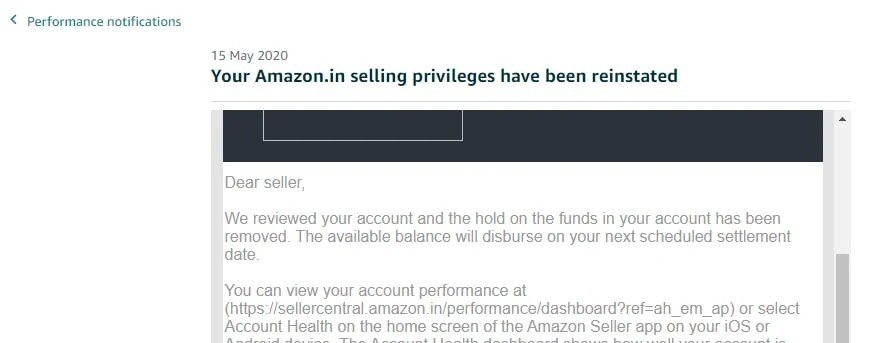
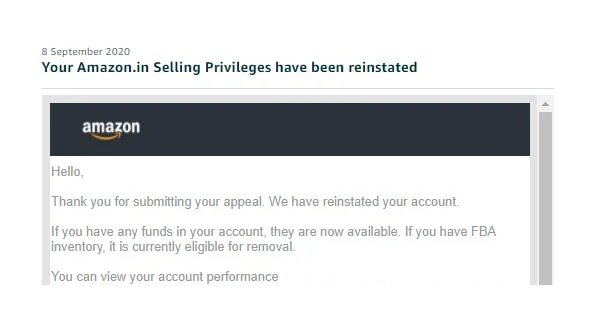
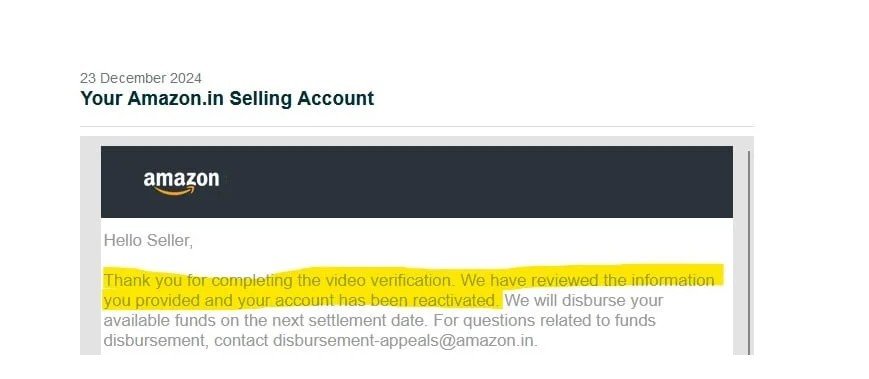
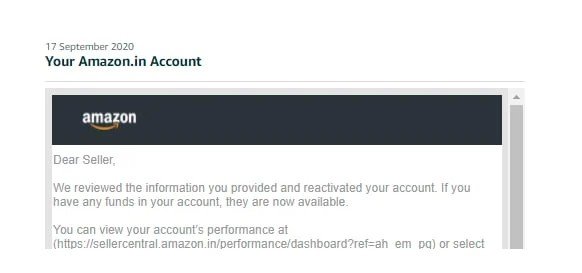
These are reinstatement emails from client cases we handled, including cases that had been rejected before they reached us.
How our fee works
A rejected appeal often needs a fresh look rather than another rewrite. You pay a small part to start, and the rest only when you are selling again.
Tap the WhatsApp icon on your screen to start. The first review of your rejection is free.
Frequently asked questions
Is there an official Amazon Plan of Action template?
No. Amazon asks for the root cause, the actions you have taken and the steps you will take to prevent it, but it does not publish a fill-in template. A structure like the one in this guide covers what reviewers expect.
How long should an Amazon POA be?
Usually one to two pages. It should be long enough to answer every point in the notice with evidence, and short enough that a reviewer can read it quickly.
Can I use the same Plan of Action for a second appeal?
No. If the first POA was rejected, something in it did not satisfy Amazon. A second appeal should explain what was missing and add new evidence. Read our guide on what to do after a rejected appeal.
Where do I submit my Plan of Action?
In most cases through the Account Health page in Seller Central, using the appeal option next to the violation or the reactivation option for a deactivated account. The notice email usually tells you where to respond.
Can you write my Plan of Action for me?
Yes. Our appeals team reads your notice for free, then investigates the account and writes a Plan of Action specific to your case. No one can guarantee Amazon’s decision, but a well-researched POA gives your appeal the best chance.
Need help with this suspension?
Send us your notice for a free case review. You get an honest answer before you pay.
Want us to write it for you? See our Amazon appeal and reinstatement services.
Get Amazon account-health alerts
New policy changes, common deactivation triggers and how to avoid them. Occasional emails from our appeals team, no spam.
By subscribing you agree to receive emails from SellerReinstatement. Unsubscribe anytime. See our Privacy Policy.
Leave a Reply