Category: Amazon India

Guides for Amazon.in sellers: MRP and pricing rules, restricted-product licences, Brand Approval, Valid Tracking Rate with Indian couriers, and disbursement-appeals@amazon.in for withheld funds.

  • Amazon Potential High Pricing Error: Why Your Listing Was Deactivated and How to Fix It

    Your offer has gone inactive and Account Health shows “Your price is a potential high pricing error” with an Update Pricing button. This is a price check, not a complaint about the product. Here is what Amazon compares your price against, how to bring the offer back, and when to appeal instead of changing the price.

    By SellerReinstatement Appeals TeamUpdated November 20267 min read

    Quick answer

    Amazon removes an offer when its price looks like a mistake next to its reference prices, such as the Featured Offer price and the 60-day average selling price. To reactivate it, open the pricing-error row in Account Health or the Pricing Health page, read the reference prices shown, and correct your price (and your minimum and maximum price limits). If your price is right, Amazon’s Marketplace Pricing Error Policy lets you appeal the offer suppression through Seller Support.

    Key takeaways

    • A potential pricing error removes the offer, not the account. Amazon’s policy says serious or repeated cases can lead to suspension.
    • Amazon checks your total price: item price plus shipping.
    • An offer can be flagged even when it equals the Featured Offer price, if it sits far above the 60-day average selling price.
    • A potential low pricing error usually means your price is below the minimum price you set.
    • Fix the price in Pricing Health. Appeal through Seller Support only when the price is genuinely right.
    • Repeated errors usually come from a repricer rule or a bulk price file. Fix the source, not only the one ASIN.

    Need help with this suspension?

    Send us your notice for a free case review. You get an honest answer before you pay.

    What a “potential pricing error” notice means

    Amazon’s Marketplace Pricing Error Policy says Amazon regularly monitors item prices, including shipping charges, and compares the prices sellers set with past selling prices and other prices in the store. When a price looks like an error, Amazon may remove the Featured Offer (Buy Box), remove the offer itself, or, in serious or repeated cases, suspend or end selling privileges.

    In Seller Central the offer turns inactive and a row appears on Account Health or on the Pricing Health page, for example “Your price is a potential high pricing error”, with an Update Pricing button. The product detail page stays live for other sellers; only your offer is taken down until the price is dealt with.

    The policy names two practices it treats as harmful to customer trust: a reference price (such as a “was” price) that cannot be commercially justified, and a price significantly higher than recent prices offered on Amazon.

    What Amazon compares your price against

    Amazon’s Pricing Health help page lists the reference prices it can use:

    • The Featured Offer price
    • The 60-day average selling price
    • A price worked out from the per-unit Featured Offer price of a smaller bundle of the same product
    • The “was” price
    • The 60-day average offer price

    The pricing-error panel shows the reference prices that apply to your offer, each with a Match button, next to your current price and your minimum and maximum price. Read all of them before you change anything. In a case we handled, an offer was flagged while it was exactly equal to the Featured Offer price, because both sat about 50% above the 60-day average selling price. Matching the Buy Box does not by itself protect you.

    Amazon looks at the total price, meaning item price plus shipping. A normal item price with a high shipping charge can trigger the same flag.

    Potential high pricing error vs potential low pricing error

    High pricing error: your total price is far above recent or reference prices. Common causes we see are a repricer rule that climbs when competitors run out of stock, a typing slip such as an extra zero, a multi-pack price placed on a single-unit listing, an old price left in place after the market moved, and a costly shipping template.

    Low pricing error: Amazon’s Pricing Health page says it also uses limits you set yourself, for example when your offer price is lower than the minimum price you previously entered. The fix is to correct either the price or the minimum price. Amazon notes that its one-click Match action also lowers your minimum price where needed, so the match does not create this error.

    How to fix a potential pricing error and reactivate the offer

    1. Open Account Health and click the pricing-error row, or go to Pricing Health from the Pricing menu.
    2. Write down the reference prices shown, your current price, and your minimum and maximum price.
    3. Decide the price you can justify: check your purchase cost, competing offers and, in India, the MRP printed on the pack.
    4. Run Amazon’s five checks for a potential high pricing error (help page GM665AS5HYKFJB8Z): your price is at or below the MRP (India; the MRP field must match the printed MRP); it is in line with the reference prices shown; the shipping fee is not excessive; your maximum price is not below any other price you set (sale or business price); and it meets local law.
    5. Use Match, or type a new price. Also check your sale price and business price, and that your minimum and maximum limits do not conflict with the new price.
    6. Save, then recheck the offer status in Manage All Inventory.
    7. If the price came from a repricer, a feed or a bulk file, correct it there too. Otherwise the next update pushes the same price back and the offer is removed again.

    Matching the average selling price is not always the right answer. If that price is below your cost, you can leave the offer inactive or appeal with evidence. That is a business decision, and Amazon’s policy says sellers remain free to set their own prices.

    When your price is correct: how to appeal

    The policy says sellers can contact Seller Support to appeal an offer suppression and Amazon will review the case. Appeal when the reference price is misleading, for example when the average came from a short sale, a different pack size or an older MRP.

    Keep the case short and factual: the ASIN, SKU and price; why the price is right; and the evidence, such as a current purchase invoice, a clear photo of the printed MRP, or proof that the low reference price belongs to a different pack size. For a single offer this is a listing-level price review, so a plain message with evidence fits better than a long plan of action. If you are unsure how to read the notice, see how to read an Amazon suspension notice.

    Can pricing errors affect the whole account?

    Yes, if they keep happening. Amazon’s policy states that serious or repeated pricing practices that harm customer trust can lead to suspension or termination of selling privileges. A dozen pricing errors in a few months tells Amazon there is a system problem, not a single slip.

    Even an account in the Account Health Assurance program loses that protection if the same policy issue keeps repeating. If an account is deactivated over pricing, the appeal has to name the real source (the repricer rule or the price file), show it corrected across all SKUs, and explain the checks now in place.

    How to prevent pricing errors

    • Set a realistic minimum and maximum price on every SKU, so a wrong value is blocked before it goes live.
    • Put a ceiling on repricer rules, especially for times when you are the only seller left.
    • Check bulk price files before upload: shifted columns, extra zeros and pack quantities.
    • Compare your total price, item plus shipping, against the Featured Offer, not the item price alone.
    • In India, keep the price and MRP fields in line with the MRP printed on the pack.
    • Open Pricing Health every week and clear new rows the same day.

    If listings have been removed for pricing or other reasons and you need them back, see our Amazon listing reinstatement help.

    How our fee works

    A rejected appeal often needs a fresh look rather than another rewrite. You pay a small part to start, and the rest only when you are selling again.

    $150To start: our full investigation ($200 for complex cases). Non-refundable.
    $350Only after your account is reinstated ($400 for complex cases).

    Tap the WhatsApp icon on your screen to start. The first review of your rejection is free.

    Frequently asked questions

    Why did Amazon deactivate my listing for a potential pricing error?

    Amazon compares your total price, including shipping, with reference prices such as the Featured Offer price and the 60-day average selling price. When your price looks like a mistake against them, Amazon removes the offer until the price is corrected or reviewed.

    How do I fix a potential high pricing error on Amazon?

    Open the pricing-error row in Account Health or the Pricing Health page, read the reference prices shown, then match one of them or enter a price you can justify. Also correct the repricer or price file that set the wrong price.

    What is a potential low pricing error?

    It usually means your price is below the minimum price you set for that SKU. Correct the price or lower the minimum price. Amazon’s one-click Match action adjusts the minimum price where needed.

    Can my offer be flagged when my price matches the Buy Box?

    Yes. The Featured Offer price is only one reference. If it is far above the 60-day average selling price, an offer at the Featured Offer price can still be flagged as a potential high pricing error.

    How do I appeal a pricing error deactivation?

    Amazon’s Marketplace Pricing Error Policy says you can contact Seller Support to appeal an offer suppression. Give the ASIN, SKU and price, explain why the price is right, and attach evidence such as an invoice or a photo of the printed MRP.

    Can pricing errors get my Amazon seller account suspended?

    A single error removes only the offer. Amazon’s policy says serious or repeated cases can lead to suspension or termination of selling privileges, so repeated errors should be fixed at the source.

    Need help with this suspension?

    Send us your notice for a free case review. You get an honest answer before you pay.

    SellerReinstatement Appeals Team

    The SellerReinstatement appeals team has handled Amazon seller account reinstatement cases since 2014 across every Amazon marketplace. Every guide comes from real cases.

  • Amazon Valid Tracking Rate Below 95%: What the Warning Means and How to Fix It

    This is a warning, not a deactivation. Amazon is telling you that too many of your seller-fulfilled shipments have no tracking number it can verify, and that your selling privileges may be restricted if that does not improve.

    By SellerReinstatement Appeals TeamUpdated November 20266 min read

    Quick answer

    The warning means fewer than 95% of your seller-fulfilled shipments had a valid tracking number with the correct carrier. Fix how tracking is entered for each shipping method, confirm every new shipment with a real carrier tracking number, and prepare a short Plan of Action. Amazon says selling privileges may be restricted if the rate does not improve.

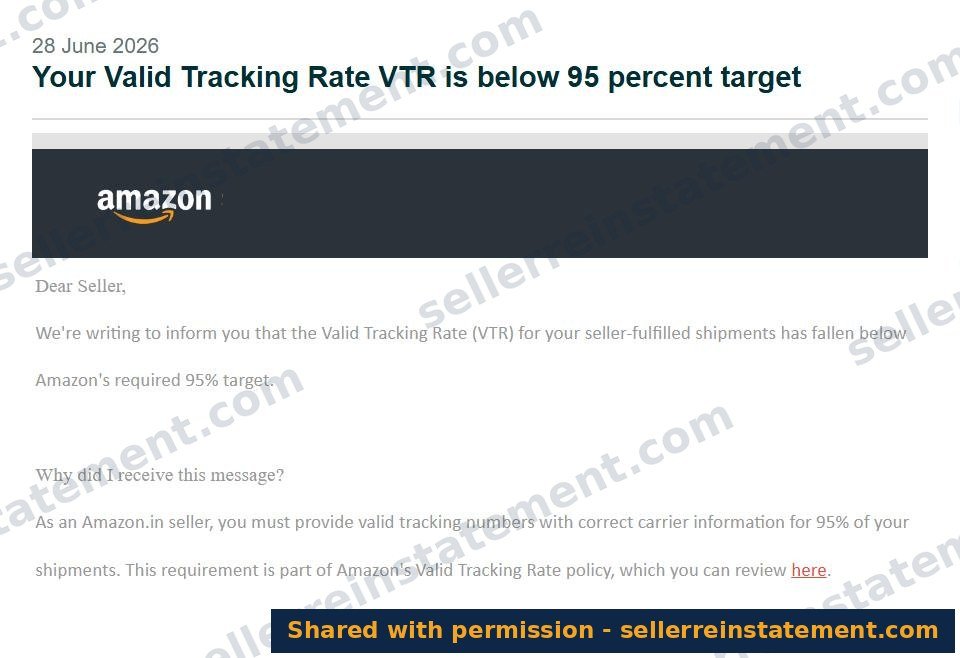
    Amazon notice that Valid Tracking Rate is below the 95 percent target, from a client case shared with permission
    Real notice The Amazon notice this guide explains, from one of our client cases. Shared with permission, store details hidden. Tap to view full size.

    Key takeaways

    • Valid Tracking Rate applies to the shipments you fulfil yourself.
    • A tracking number counts only when it is real and entered with the correct carrier.
    • The fix depends on how you ship: self-delivery, an integrated carrier or a non-integrated carrier.
    • Amazon encourages a Plan of Action even at the warning stage.
    • Shipments without tracking often become “item not received” claims, which then raise your order defect rate.

    Need help with this suspension?

    Send us your notice for a free case review. You get an honest answer before you pay.

    What the warning says

    The subject line is “Your Valid Tracking Rate VTR is below 95 percent target”. The key sentence is:

    From Amazon’s notice

    The Valid Tracking Rate (VTR) for your seller-fulfilled shipments has fallen below Amazon’s required 95% target.

    The notice ends with the consequence: if your rate does not improve, your selling privileges on Amazon may be restricted.

    What counts as valid tracking

    Amazon requires valid tracking numbers with correct carrier information for 95% of seller-fulfilled shipments. The usual causes of a low rate are simple process gaps:

    • Confirming shipment with no tracking number.
    • Choosing the wrong carrier from the list, so the number cannot be matched.
    • Typing errors in the tracking number.
    • Using a carrier Amazon is not integrated with.
    • Local or self-delivery with no scan recorded.

    Not sure what your notice is asking for? Tap the green WhatsApp icon on your screen and send us the notice. Reading it is free.

    How to fix it by shipping method

    How you shipWhat Amazon asks you to do
    Self-deliveryUpdate tracking by scanning the shipping label with the Amazon Track app.
    Integrated third-party carrierClick Confirm Shipment and enter the tracking number given by the courier.
    Non-integrated third-party carrierSubmit the carrier name to Amazon so it can work on integration, or move to an integrated carrier.

    This table comes from Amazon’s notice to an Amazon.in seller. On other marketplaces the principle is the same: use an integrated carrier or Amazon’s own shipping labels so tracking is recorded automatically.

    Courier shows “delivered” but Amazon counts it invalid

    This is the most common surprise. Amazon does not read the courier’s website. It counts a tracking number as valid only when the courier sends Amazon at least one physical scan. Amazon’s Valid Tracking Rate help page (G201817070) says that if the carrier does not send valid scan events, the tracking ID is treated as invalid “even if it appears valid on the carrier’s website”. So a screenshot of the courier’s tracking page does not change the metric. Check these, in this order:

    1. Carrier chosen from the drop-down. On Amazon.in, Delhivery, BlueDart, DTDC, India Post, XpressBees, Shadowfax and others are integrated couriers (Amazon.in VTR FAQ, G202014610). Typing an integrated courier under “Other” makes the tracking invalid.
    2. Tracking entered in the right place and on time. Amazon.in gives three reasons the report shows “X” although tracking was uploaded: the wrong courier name was selected; the tracking went into a part of the order page the customer cannot track; or it was uploaded after the order was delivered or after the ship-by date.
    3. Correct it before the Promised Delivery Date. Wrong details can be fixed from Manage Orders until the promised delivery date. After that date the tracking cannot be changed, so those orders only drop out as they leave the 30-day window.
    4. Number right and still invalid? Amazon.in’s FAQ says to re-submit it once, then open a Seller Support case for additional investigation. Keep it as a record. The lasting fix is a courier whose scans actually reach Amazon.

    Allow about 72 hours after a correction before the report and the metric show it (G201817070).

    A cancelled order is in my VTR report

    Amazon.in explains that cancelled orders show in the report because the shipment was confirmed before the parcel was handed to the courier (G202014610). The usual story: a courier is booked, shipment is confirmed with that number, and the booking is then cancelled or never picked up. Amazon still holds that number, and it never gets a scan.

    • Confirm shipment only after the courier has actually picked up the parcel.
    • If the parcel went with a different courier, enter that courier’s tracking number before the promised delivery date.
    • Never use one tracking number for two orders. Amazon rejects the same tracking ID on more than one order.

    If your listings in a category are suspended

    Valid Tracking Rate is measured per product category, over 30 days by promised delivery date. If a category stays below 95%, Amazon can suspend that category’s seller-fulfilled listings; FBA orders are not part of this metric. An “Appeal” button then shows next to that category on the Account Health page. If the appeal is approved, the listings in that category come back; if it is denied, Amazon emails asking for more information (G201817070).

    Write that appeal with facts: for each invalid order, the real cause from the report; the dated change you made (for example, “since 20 November we confirm shipment only after courier pickup”); and the report with those rows marked. Blaming the courier does not help — Amazon’s page says it is not responsible for carrier failures. If an appeal has already been denied, our Amazon seller account reinstatement service starts with a free read of the notice and the report.

    What to do after the warning

    1. Download your orders for the last 30 days and mark every shipment without valid tracking.
    2. Group them by cause using the list above.
    3. Fix the process, not single orders: one carrier list, one person or system responsible for confirming shipments.
    4. Write a short Plan of Action with the cause, what you changed and how you will check it weekly. Our performance Plan of Action sample shows the structure.
    5. Watch the rate on Account Health every week until it is back above 95%.

    Mistakes to avoid

    • Entering made-up or reused tracking numbers. Amazon checks them against the carrier.
    • Selecting “Other” as the carrier when the real carrier is on the list.
    • Confirming shipment before the label exists.
    • Ignoring repeated warnings. If the rate also pushes up claims, the next notice may be the 72-hour deactivation warning.

    How our fee works

    A rejected appeal often needs a fresh look rather than another rewrite. You pay a small part to start, and the rest only when you are selling again.

    $150To start: our full investigation ($200 for complex cases). Non-refundable.
    $350Only after your account is reinstated ($400 for complex cases).

    Tap the WhatsApp icon on your screen to start. The first review of your rejection is free.

    Frequently asked questions

    What is Amazon’s Valid Tracking Rate target?

    Amazon requires valid tracking numbers with correct carrier information for 95% of seller-fulfilled shipments.

    Will my account be deactivated for a low Valid Tracking Rate?

    The warning says your selling privileges may be restricted if the rate does not improve. Treat the first warning as the time to fix the process.

    Do FBA orders count toward Valid Tracking Rate?

    No. The rate covers shipments you fulfil yourself.

    Do I need a Plan of Action for a warning?

    Amazon’s notice encourages you to create one. Having it ready also helps if Amazon later asks for it.

    The courier website shows my parcel was delivered. Why does Amazon count the tracking as invalid?

    Amazon counts tracking as valid only when the courier sends Amazon at least one physical scan. If no scan reaches Amazon, the tracking ID is invalid even if it looks valid on the courier’s website (G201817070). Choose the courier from the drop-down and use couriers whose scans reach Amazon.

    Why is a cancelled order showing in my Valid Tracking Rate report?

    Amazon.in says this happens when shipment was confirmed before the parcel was handed to the courier (G202014610). Confirm shipment only after pickup, and never reuse one tracking number for two orders.

    Can I change a tracking number after the promised delivery date?

    No. Tracking details can be corrected only until the promised delivery date. After that, the order stays in the report until it leaves the 30-day window (G201817070).

    Need help with this suspension?

    Send us your notice for a free case review. You get an honest answer before you pay.

    SellerReinstatement Appeals Team

    The SellerReinstatement appeals team has handled Amazon seller account reinstatement cases since 2014 across every Amazon marketplace. Every guide comes from real cases.