An Amazon suspension notice tells you more than it seems to, if you know where to look. This guide walks through each part of an Amazon suspension notice, explains the wording Amazon uses, and shows how our appeals team turns a notice into a clear plan before anything is sent.
Quick answer
To read an Amazon suspension notice, find four things: the level (one listing or the whole account), the policy Amazon names, the evidence it points to (ASINs, order IDs, complaints), and what it asks for (documents, a Plan of Action, or both). Check the same notice in Account Health before you write anything.
Key takeaways
- Read the notice in Seller Central Account Health, not only the email.
- First decide: is it one listing, a selling privilege, or the whole account?
- The policy name tells you what kind of appeal Amazon expects.
- Some notices need documents, some need a Plan of Action, some need both.
- Do not reply to the email, open a new account or appeal in a rush.
Not sure what your notice means?
Send it to us for a free review. Our appeals team tells you honestly what we see before you pay anything.
Where to find your Amazon suspension notice
Amazon usually sends the notice in two places: an email to the address on your seller account, and a message in Seller Central. The Seller Central version is the one that matters, because it sits next to the appeal option and lists any documents Amazon wants.
- Account Health (Performance menu): the policy, the affected ASINs and the appeal button.
- Performance Notifications: the full text of every notice, with dates.
- Your email inbox: check spam folders, and confirm the sender is really Amazon before you click anything.
- Earlier warnings: older notices often explain what the latest one is about.
The 4 parts of every Amazon suspension notice
Most notices follow the same pattern, even when the wording changes. Read them in this order.
| Part | What it tells you | What to do with it |
|---|---|---|
| 1. Level | Whether Amazon removed one listing, restricted a category or brand, held funds, or deactivated the whole account. | Listing-level problems are usually faster to fix. Account-level ones need a full appeal. |
| 2. Policy | The rule Amazon believes was broken, such as inauthentic, IP, restricted products, performance or Section 3. | Match your appeal to this policy. A good appeal for the wrong policy still fails. |
| 3. Evidence | ASINs, order IDs, buyer complaints, rights owner details or a linked account. | List every item Amazon names. Your appeal must answer each one. |
| 4. The ask | Documents, a Plan of Action, a video call, or information Amazon wants verified. | Send exactly what is asked, in a format that matches your Seller Central details. |
Got a notice you can’t make sense of? Tap the green WhatsApp icon on your screen and send it to us. Reading it is free.
Common Amazon notice wording, decoded
Amazon does not use one fixed template, but these phrases come up again and again in the notices our clients send us. Here is what they usually mean.
| Typical wording | What it usually means |
|---|---|
| Your selling account has been deactivated | Account level. Listings are inactive and funds may be held until the case is resolved. See deactivated vs suspended. |
| Your account is at risk of deactivation | A warning. You still have time to fix the cause before it becomes a deactivation. |
| We received complaints that items are inauthentic | Supply chain proof is needed, usually supplier invoices. See our inauthentic suspension guide. |
| Your account or a related account | Section 3 or related account language. Amazon may not say which account it means. See our Section 3 guide. |
| We could not verify the information you provided | A verification problem, fixed with matching documents rather than a Plan of Action. See verification and funds. |
| Your account did not meet our performance targets | Performance case: order defects, late shipments or cancellations. See our performance Plan of Action sample. |
What Amazon is really asking for
Every notice falls into one of three types of request. Getting this right decides what you prepare.
Documents only
Identity, address, bank and business verification cases. Amazon wants documents where the name and address match Seller Central exactly. A long explanation does not help here.
A Plan of Action
Policy and performance cases. Amazon wants the root cause, the corrective actions you have already taken and the preventive measures you will keep. Our Amazon Plan of Action template shows the structure.
Both
Inauthentic, IP and restricted products cases often need a Plan of Action plus proof, such as invoices, authorization letters or test reports.
When your Amazon suspension notice is vague
Some notices, especially Section 3 and related account cases, give very little detail. That does not mean the case is hopeless. It means you need to find the cause yourself before you write.
- Check Account Health for every open policy violation and its date.
- Read recent buyer messages, returns and product reviews.
- List every outside service you used: review tools, agencies, prep centers.
- Think about shared devices, addresses, bank accounts or family accounts.
If you still cannot see the reason, do not guess in your appeal. A wrong root cause is one of the most common reasons appeals get rejected. Our guide on what to do when an appeal is rejected explains why.
Your first 48 hours after the notice
| Do this | Avoid this |
|---|---|
| Save the full notice text and take screenshots of Account Health. | Replying to the notice email or opening many Seller Support cases. |
| Collect invoices, IDs and documents that match your account details. | Sending a quick appeal the same day without fixing anything. |
| Fix or remove the listings Amazon named. | Opening a new seller account while this one is deactivated. |
| Get a second opinion on the notice before you submit. | Copying a template that does not match your notice. |
For more on who to contact and when, read how to contact Amazon about a suspended account.
Real reinstatement results
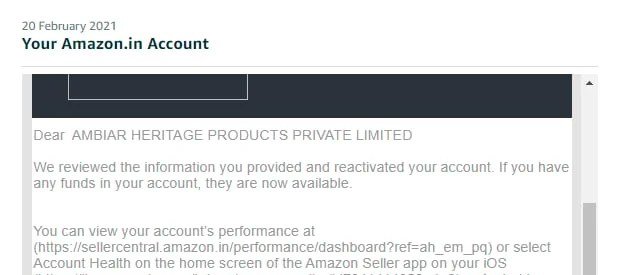
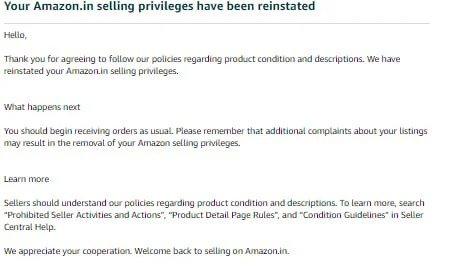
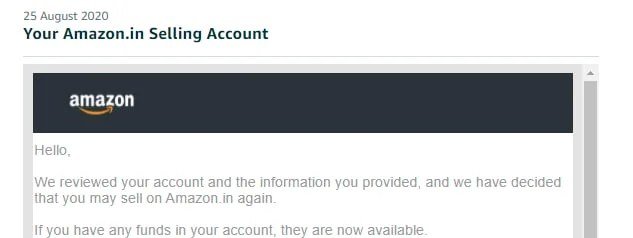
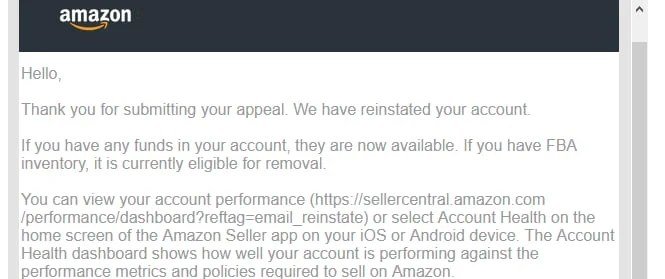
These are reinstatement emails from client cases we handled. Every one started with a notice like yours.
How our fee works
Reading your notice is free. If we take the case, you pay a small part to start and the rest only when you are selling again.
Complex cases are Section 3, counterfeit, related accounts, review manipulation and dropshipping. See our Amazon reinstatement cost guide for how pricing works across the industry.
Frequently asked questions
Where do I find my Amazon suspension notice?
Amazon sends it by email and also shows it in Seller Central under Performance, Account Health, and in Performance Notifications. Read the Seller Central version, because it shows the appeal button and any documents Amazon is asking for.
What if my notice does not explain the reason clearly?
Vague notices are common, especially for Section 3 and related account cases. Check Account Health for policy violations, recent complaints, ASINs and order IDs, and review any outside tools, agencies or accounts linked to your business. Our appeals team reads notices for free.
Does every notice need a Plan of Action?
No. Verification and document requests usually need the right documents, not a Plan of Action. Policy and performance cases usually need a Plan of Action that explains the root cause, what you fixed and how you will prevent it.
Should I reply to the notice email?
Usually no. Most notice emails come from an address that does not accept replies. Appeal through Account Health in Seller Central, where Amazon tracks your case.
How much does help with an Amazon notice cost?
Reading your notice is free. Standard cases cost $150 to start (non-refundable) and $350 only after reinstatement. Complex cases such as Section 3, counterfeit, related accounts, review manipulation or dropshipping cost $200 to start and $400 after reinstatement.
Send us your notice for a free review
Our appeals team reads it and tells you honestly what we see, and what Amazon is likely to want.
Need hands-on help? See our Amazon reinstatement services.
Get Amazon account-health alerts
New policy changes, common deactivation triggers and how to avoid them. Occasional emails from our appeals team, no spam.
By subscribing you agree to receive emails from SellerReinstatement. Unsubscribe anytime. See our Privacy Policy.
Leave a Reply