Tag: Seller Central how-to

  • Amazon Seller Support Email Addresses by Marketplace (US, UK, India, UAE and More): Which Official Address Is for What

    Which Amazon email addresses are official, what each one is for, and why most problems (appeals included) have no email route at all. Every address below comes from an Amazon help page or an Amazon email we received.

    By SellerReinstatement Appeals TeamUpdated November 20267 min read

    Quick answer

    Amazon publishes only a few seller email addresses, each for one job: disbursement-appeals@amazon.<marketplace> for withheld funds after a deactivation that was not reinstated, and pricing-error-feedback@amazon.com for feedback on the pricing error policy. There is no email for appealing a suspension: that goes through Account Health > Reactivate your account. Last checked 22 Nov 2026.

    Key takeaways

    • Account appeals have no email route: use Account Health > Reactivate your account.
    • disbursement-appeals@ addresses are for withheld funds only, per marketplace (G9RA9LYBJ3QP27M6).
    • pricing-error-feedback@amazon.com is for policy feedback, not reinstatement.
    • Every address here has a source and a last-checked date; Amazon changes them.

    Not sure which route fits your notice?

    Send us the notice text. We check it free and tell you the correct route — appeal, funds request or listing fix.

    The short version

    Amazon handles almost every seller problem inside Seller Central, not by email. Account and listing appeals go through Account Health, and most other questions go through Seller Support (Help > Get support). Only a few Amazon help pages publish an email address for sellers, and each one has one narrow job. This page lists only those addresses: each one was read on an official Amazon Seller Central help page (page ID beside it) or seen as the sender of an Amazon email in our own work. We do not list addresses copied from blogs, agencies or forums.

    Last checked: 22 Nov 2026. Amazon changes addresses and pages without notice, so open the help page ID in your own Seller Central before you write.

    Withheld funds after deactivation: disbursement-appeals addresses by marketplace

    When an account is deactivated and not reinstated (or no appeal is made), Amazon’s Funds disbursement eligibility policy lets the seller ask separately for the withheld balance by email. The policy page gives the waiting time: on the pages we read it is 60 days from the date the account was deactivated. Amazon then runs its own check and may ask for documents on identity, bank account and product sourcing. Note the spelling: disbursement-appeals@ (with an s), then the marketplace domain.

    MarketplaceAddressWhere Amazon publishes it
    Amazon.com (US)disbursement-appeals@amazon.comFunds disbursement eligibility policy (G9RA9LYBJ3QP27M6)
    Amazon.ca (Canada)disbursement-appeals@amazon.caFunds disbursement eligibility policy (G9RA9LYBJ3QP27M6)
    Amazon.co.uk (UK)disbursement-appeals@amazon.co.ukFunds disbursement eligibility policy (G9RA9LYBJ3QP27M6)
    Amazon.de (Germany)disbursement-appeals@amazon.deFunds disbursement eligibility policy (G9RA9LYBJ3QP27M6)
    Amazon.es (Spain)disbursement-appeals@amazon.esFunds disbursement eligibility policy (G9RA9LYBJ3QP27M6)
    Amazon.in (India)disbursement-appeals@amazon.inFunds disbursement eligibility policy (G9RA9LYBJ3QP27M6)
    Amazon.ae (UAE)disbursement-appeals@amazon.aeFunds disbursement eligibility policy (G9RA9LYBJ3QP27M6)
    Amazon.co.jp (Japan)disbursement-appeals@amazon.co.jpFunds disbursement eligibility policy (G9RA9LYBJ3QP27M6)
    Amazon.com.au (Australia)disbursement-appeals@amazon.com.auFunds disbursement eligibility policy (G9RA9LYBJ3QP27M6)

    What to know before you write:

    • This email is for funds only. It is not an appeal to reinstate the account, and it does not replace the appeal in Account Health.
    • Write from the email address registered on the seller account, give the merchant (seller) name and the deactivation date, and keep identity, bank and supplier documents ready; Amazon says it may ask for them.
    • Amazon can keep some or all funds if it finds deceptive, fraudulent or illegal activity, or repeated policy violations (same policy page). If the account is reinstated on appeal, funds are released on the normal schedule and no funds email is needed.
    • For other EU stores (France, Italy and others), open G9RA9LYBJ3QP27M6 in that store’s Seller Central to see its address.

    Full guide: Amazon holding your funds after deactivation: the 60-day appeal.

    Pricing error policy feedback: pricing-error-feedback@amazon.com

    Amazon’s Marketplace Pricing Error Policy (G5TUVJKZHUVMN77V, read on Seller Central India) says: sellers can reach out to Seller Support to appeal against offer suppression, and for feedback on the policy they can write to pricing-error-feedback@amazon.com.

    • Use it to give feedback on how the policy works, not to get a listing back.
    • To reactivate an offer deactivated for a potential pricing error, correct the price in Pricing Health (or the Account Health row’s “Update Pricing” button). If your price is correct and Amazon still blocks it, open a Seller Support case with proof such as a photo of the printed MRP.

    Step by step: Amazon potential high pricing error: why your listing was deactivated and how to fix it.

    Amazon UK Managing Director’s office: managingdirector@amazon.co.uk

    This address is not on a help page. We list it because it is the sender of an Amazon email we received in our own UK work (November 2026): writing to it returned an automatic acknowledgement within minutes, saying the message had been passed to the relevant department and asking the sender to reply to the same email if there is no answer within 2 business days.

    • It is an escalation contact for a case that has already gone through the normal Seller Central route. It is not a faster or secret way to reinstatement, and the acknowledgement does not mean a decision.
    • Write once, from the registered email, plainly and politely: the merchant name, the case or appeal dates, what Amazon asked for and what you sent. Follow up in the same thread, not with new emails.
    • UK and EU sellers also have Amazon’s mediation scheme for some decisions (help page GG7CAYUTVZKATDUY): who qualifies and the deadlines.

    Where there is no email: the right route for common problems

    ProblemAmazon’s route
    Account deactivatedAccount Health > Reactivate your account; then View Appeal to add information (200370560)
    Listing removed for a policy violationAccount Health > the violation row > Submit appeal, or fix the listing as the row allows (200370560)
    Offer suppressed for a pricing errorPricing Health / Update Pricing; then Seller Support (G5TUVJKZHUVMN77V)
    IP complaint from a rights ownerThe rights owner’s contact is given in the warning; a retraction from them can reinstate the content (G201361070)
    Negative seller feedbackFeedback Manager > Request removal (G20231, G761)
    Identity or document verificationUpload through Seller Central only; Amazon says it accepts documents only through Seller Central

    Before anything else, read the notice itself: how to read an Amazon suspension notice.

    How our fee works

    An email to the wrong address usually costs a week. If your account is deactivated, your funds are held, or a listing keeps getting refused, we can read the notice and the account history with you and tell you the right route. The first check is free; reinstatement fees are shown below.

    $150To start: our full investigation ($200 for complex cases). Non-refundable.
    $350Only after your account is reinstated ($400 for complex cases).

    Tap the WhatsApp icon on your screen to start. The first account check is free.

    Frequently asked questions

    Is there an email address to appeal an Amazon seller account suspension?

    No published one. Amazon’s appeal route for a deactivated account is Account Health > Reactivate your account in Seller Central (help page 200370560). Emails to other Amazon addresses do not replace that appeal.

    What is the Amazon seller support email ID for India or the UAE?

    Amazon does not publish a general Seller Support email for India, the UAE or the US. Seller Support works through cases: Seller Central > Help > Get support. The addresses Amazon does publish are narrow, such as disbursement-appeals@amazon.in and disbursement-appeals@amazon.ae for withheld funds after a deactivation (G9RA9LYBJ3QP27M6).

    Is it disbursement-appeal@ or disbursement-appeals@?

    On every Amazon funds policy page we read (US, Canada, UK, Germany, Spain, India, UAE, Japan, Australia) the address is disbursement-appeals@ with an s, followed by that marketplace’s Amazon domain.

    What is the disbursement-appeals email for?

    Only for asking for withheld funds after an account was deactivated and not reinstated. Amazon’s Funds disbursement eligibility policy (G9RA9LYBJ3QP27M6) gives one address per marketplace and a waiting period (60 days from deactivation on the pages we read).

    When can I email Amazon about withheld funds?

    After the waiting period on your marketplace’s funds policy page, counted from the deactivation date. On the US, UK, Spain, India and UAE pages we read it is 60 days.

    What is pricing-error-feedback@amazon.com?

    An address on Amazon’s Marketplace Pricing Error Policy (G5TUVJKZHUVMN77V) for feedback on the policy. To appeal an offer suppression, the same page points to Seller Support; the usual fix is correcting the price in Pricing Health.

    Does emailing managingdirector@amazon.co.uk get an account reinstated?

    Nobody can promise that. In our experience it returns an automatic acknowledgement and passes the email to a department. Use it only as a calm escalation after the normal Seller Central route, with your facts in one message.

    Why does this page list so few addresses?

    We only list an address we read on an official Amazon help page or saw as the sender of an Amazon email ourselves. Many addresses passed around online are old or unofficial, and writing to the wrong one wastes time.

    Do Amazon email addresses change?

    Yes. Amazon updates help pages without notice. Each address here shows its help page ID and the date we last checked it; open that ID in your own Seller Central before writing.

    Account deactivated or funds held?

    Get a free account check from our team before you write to Amazon.

    SellerReinstatement Appeals Team

    The SellerReinstatement appeals team has handled Amazon seller account reinstatement cases since 2014 across every Amazon marketplace. Every guide comes from real cases.

  • How to Add a User in Amazon Seller Central (2026 Guide)

    How to Add a User in Amazon Seller Central (2026 Guide)

    Need to give your accountant, VA or Amazon reinstatement expert access to Seller Central? Never share your password. This guide shows the new 2026 Seller Central screens, step by step with real screenshots, so even a first-time seller can add a user in about 3 minutes.

    By SellerReinstatement Appeals TeamUpdated November 20266 min read

    Quick answer

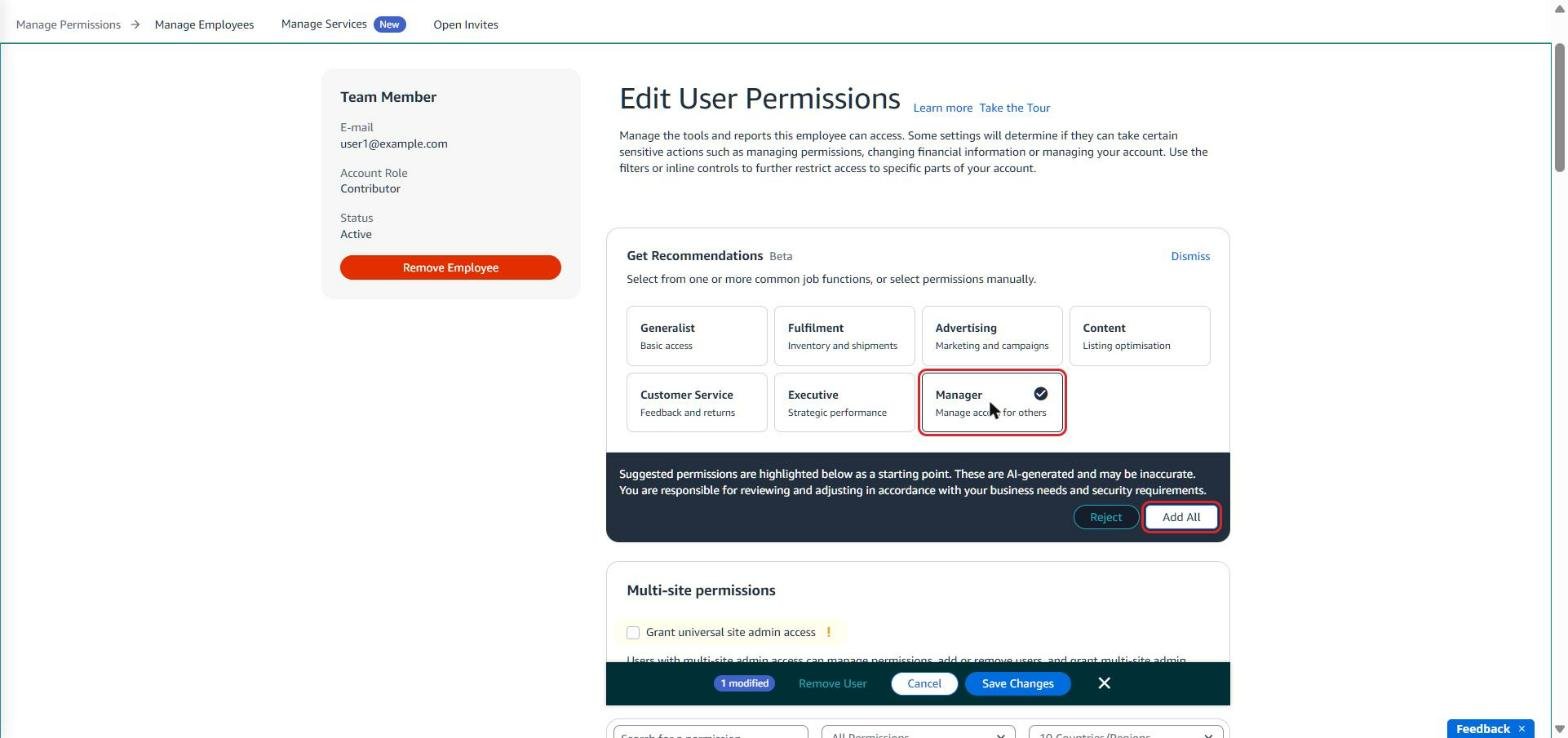
    To add a user in Amazon Seller Central: Settings ⚙️ → Manage permissions → Manage Employees → Actions → Invite Employee → enter name and email, tick sellerCentral → Send Invite. After they accept, click Edit → choose a role such as Manager → Add All → Save Changes.

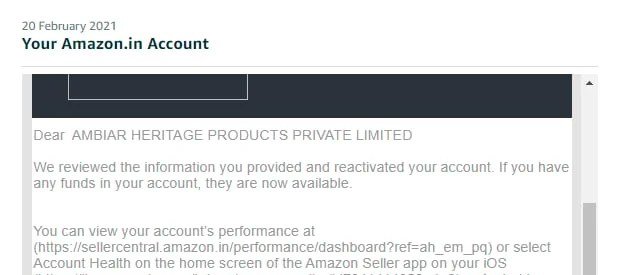
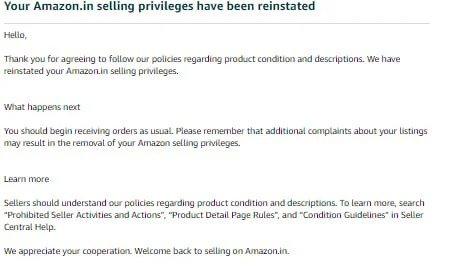
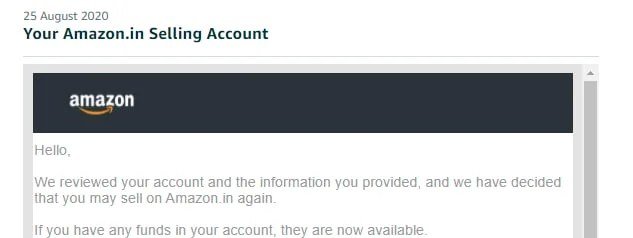
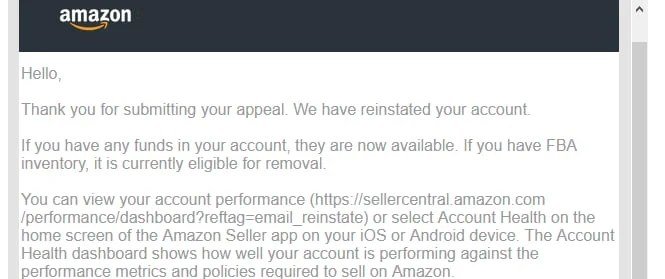
    Real Amazon reinstatement email from one of our client cases, shared with the client's permission
    Real result Amazon email from one of our client cases, shared with permission. Tap to view full size.

    Key takeaways

    • Only the account owner (or a user with permission rights) can add users. Every person gets their own login, so never share your password.
    • The 2026 path is Settings → Manage permissions → Manage Employees → Actions → Invite Employee.
    • After the user accepts, click Edit and pick a ready-made role. Manager → Add All sets everything in one click.
    • Manager → Add All also ticks universal site admin access (full admin). Give it only to someone you trust.
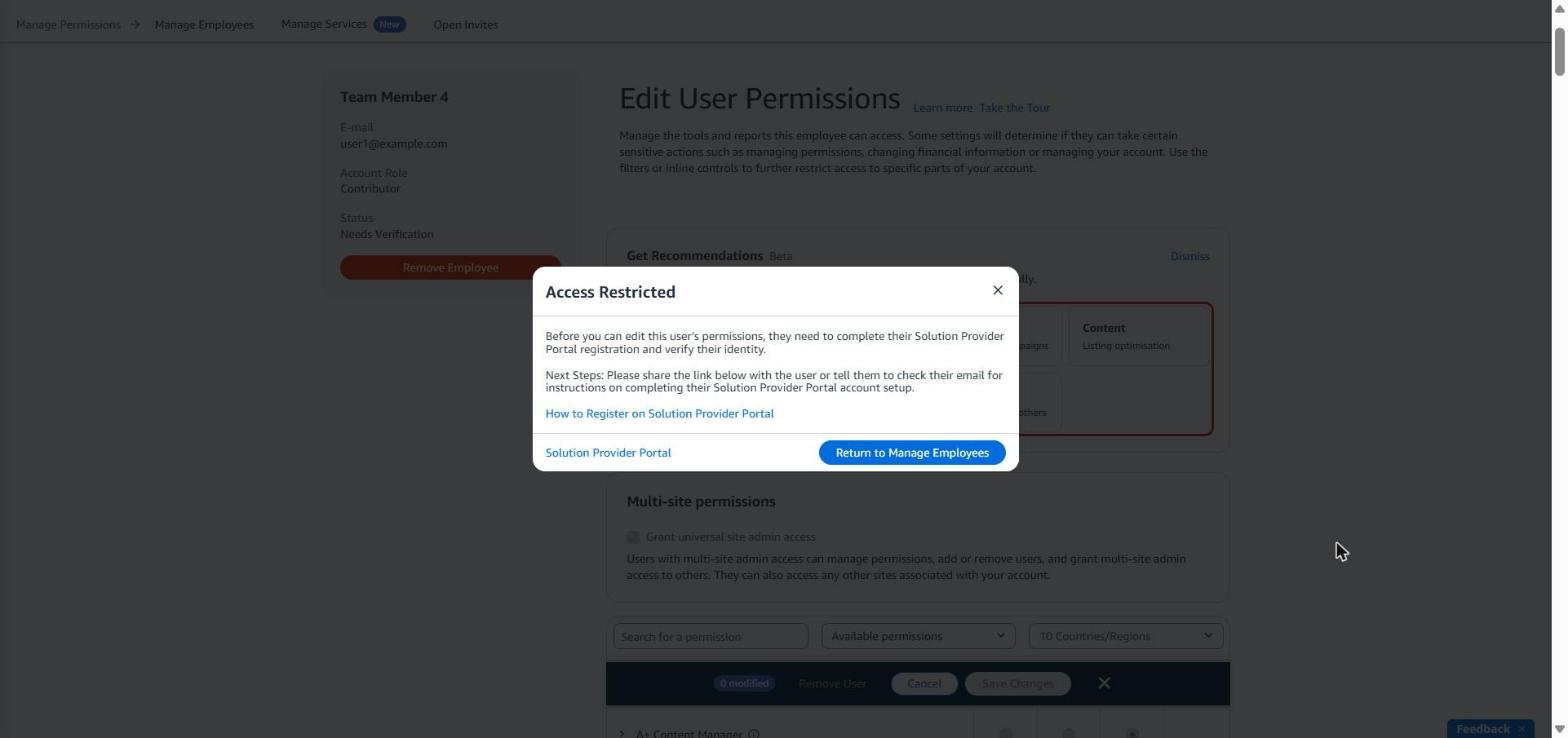
    • Seeing Access Restricted? The new user must first finish Amazon’s Solution Provider Portal verification.

    Before you start

    • Log in as the account owner (primary user), or as a user who can manage permissions.
    • Have the person’s name and email ready. They will log in with this email.
    • Amazon warns that secondary users can see sensitive data. Only add people who work for your business or a service provider you have hired.
    • Never share your own password or two-step verification codes.

    Step 1: Open Settings → Manage permissions

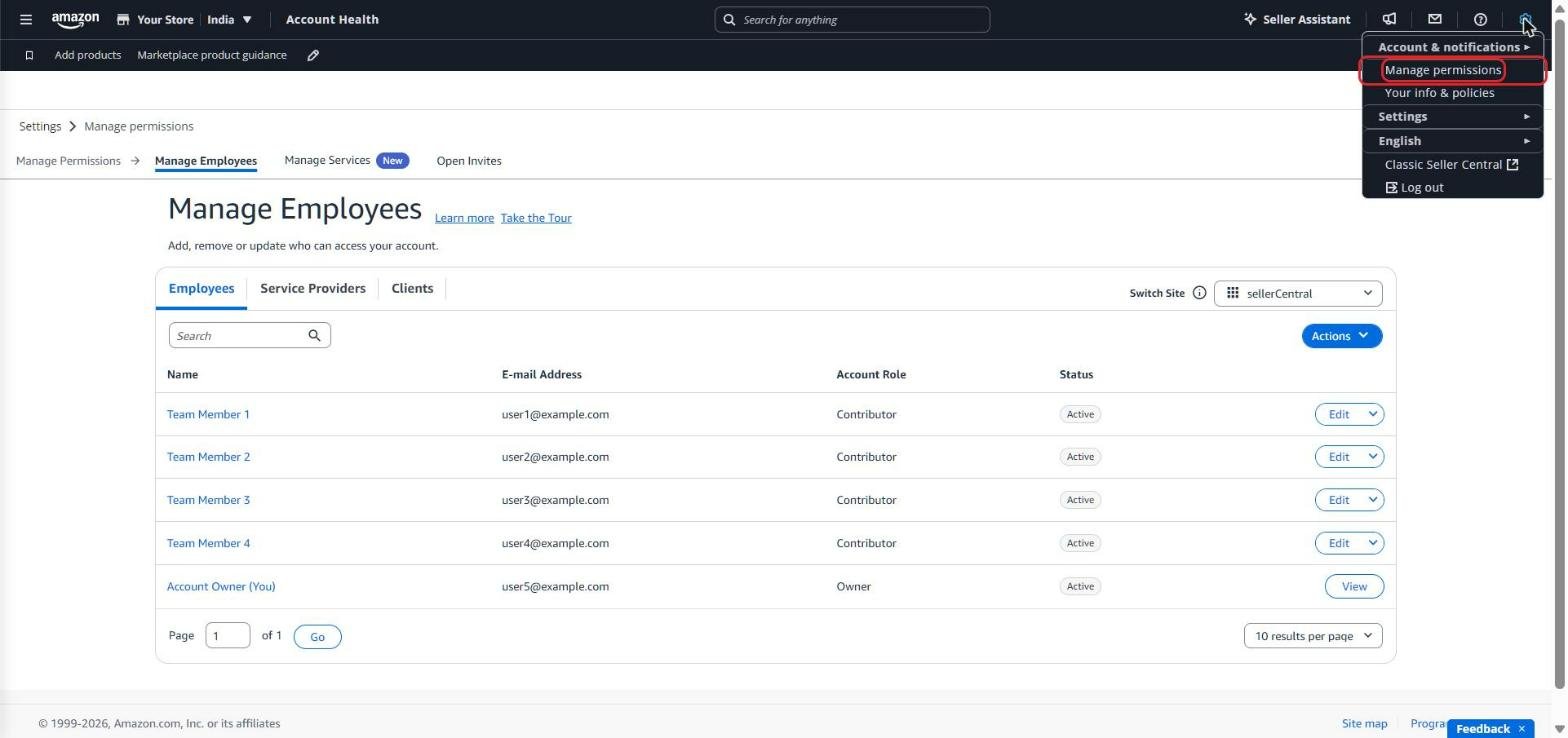
    Log in to Seller Central. Click the gear icon (Settings) at the top right and choose Manage permissions. On some accounts it is called User Permissions.

    Amazon Seller Central settings gear menu with Manage permissions highlighted
    Step 1: Settings ⚙️ → Manage permissions

    Step 2: Manage Employees → Actions → Invite Employee

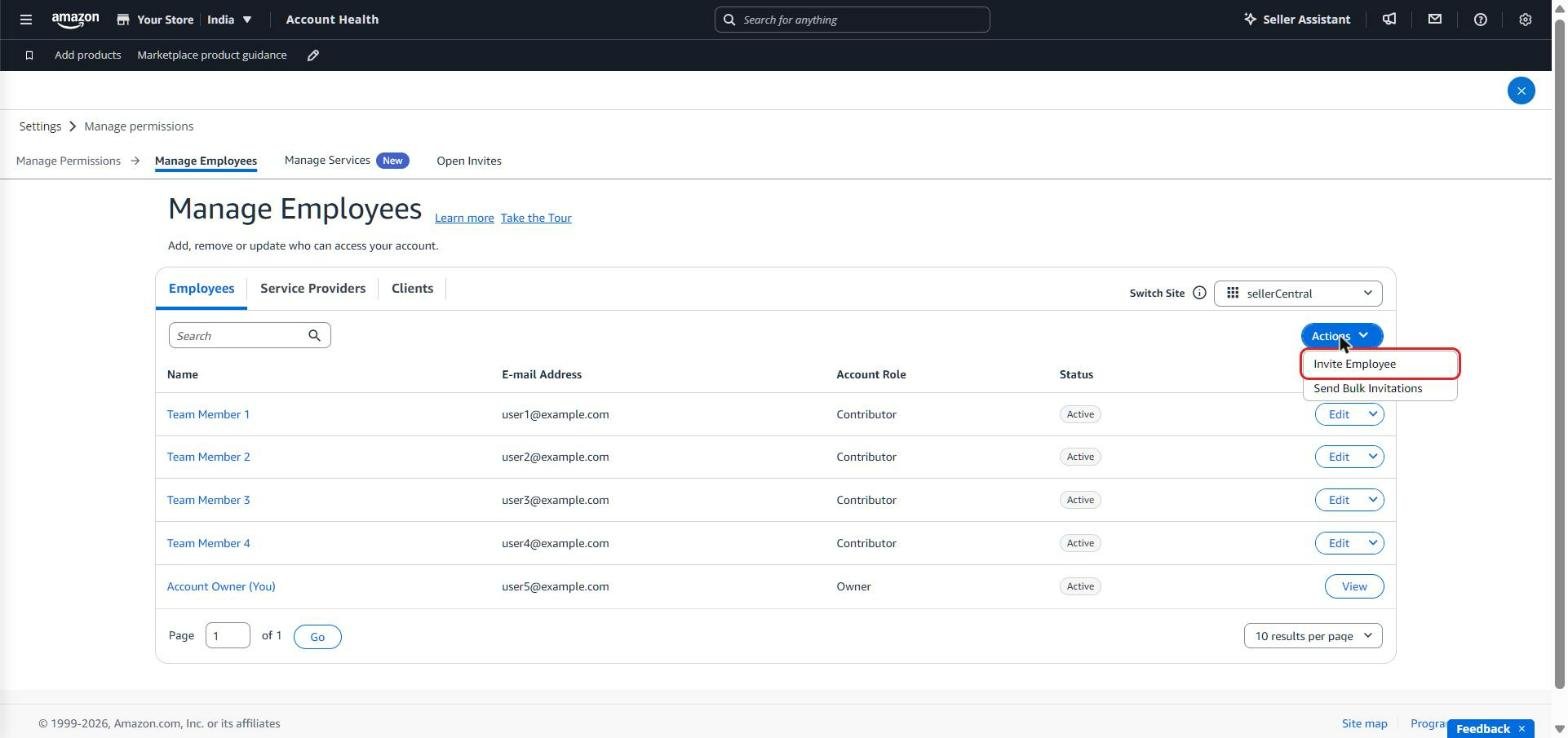
    You land on Manage Employees, which lists everyone who already has access. Click the blue Actions button and choose Invite Employee. To add many people at once, use Send Bulk Invitations.

    Manage Employees page in Amazon Seller Central with Actions menu and Invite Employee option
    Step 2: Actions → Invite Employee

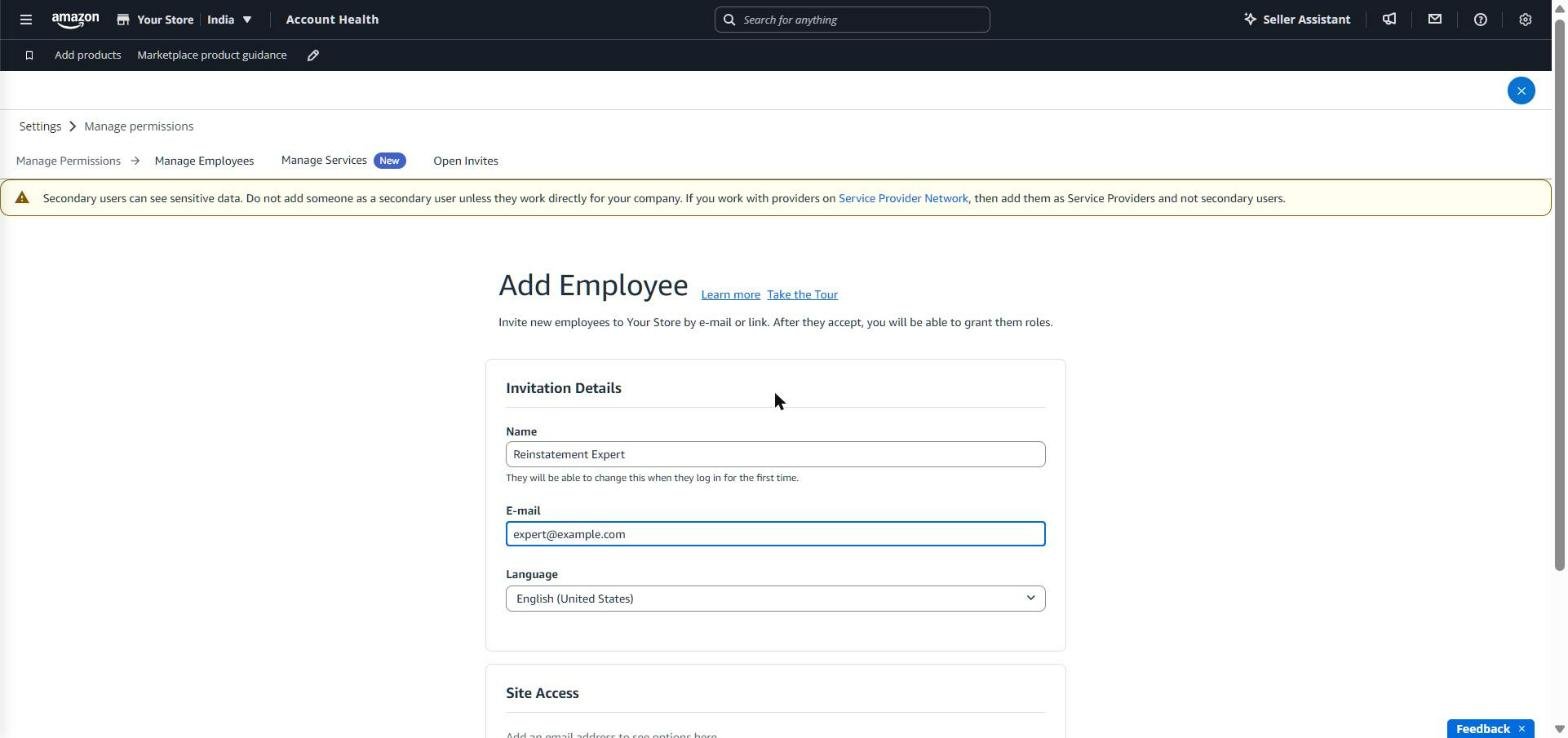
    Step 3: Enter the user’s name and email

    On the Add Employee page, type the person’s Name (they can change it later) and the E-mail they will log in with. Leave the language as English unless they prefer another one.

    Add Employee form in Amazon Seller Central with name and email fields
    Step 3: Enter name and email

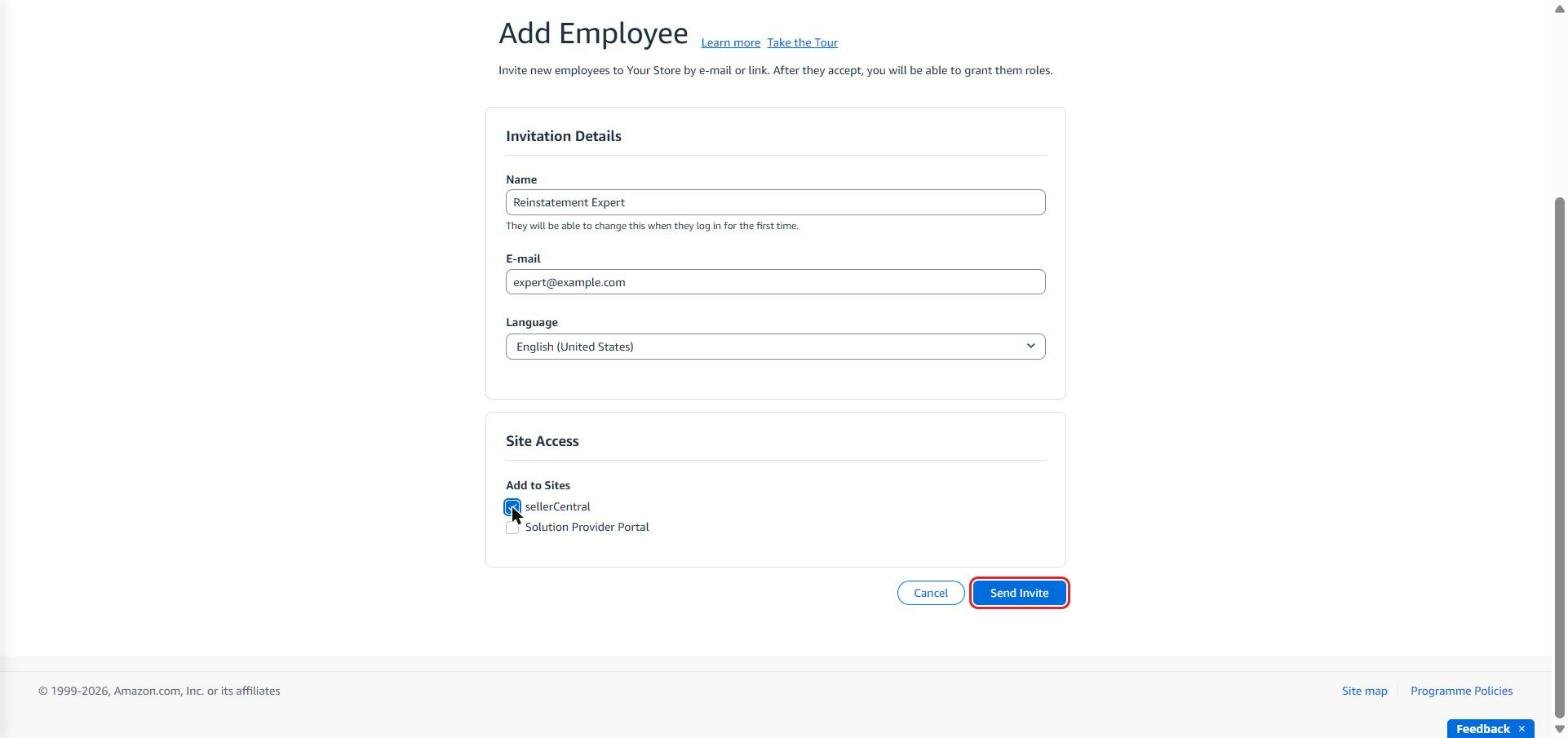
    Step 4: Tick “sellerCentral” and click Send Invite

    Under Site Access → Add to Sites, tick sellerCentral, then click Send Invite. Amazon emails the person an invitation link.

    Site Access section with sellerCentral checkbox and Send Invite button
    Step 4: Tick sellerCentral → Send Invite

    Tip: ask the person to log out of any other Amazon account before opening the invitation link. This avoids most setup errors.

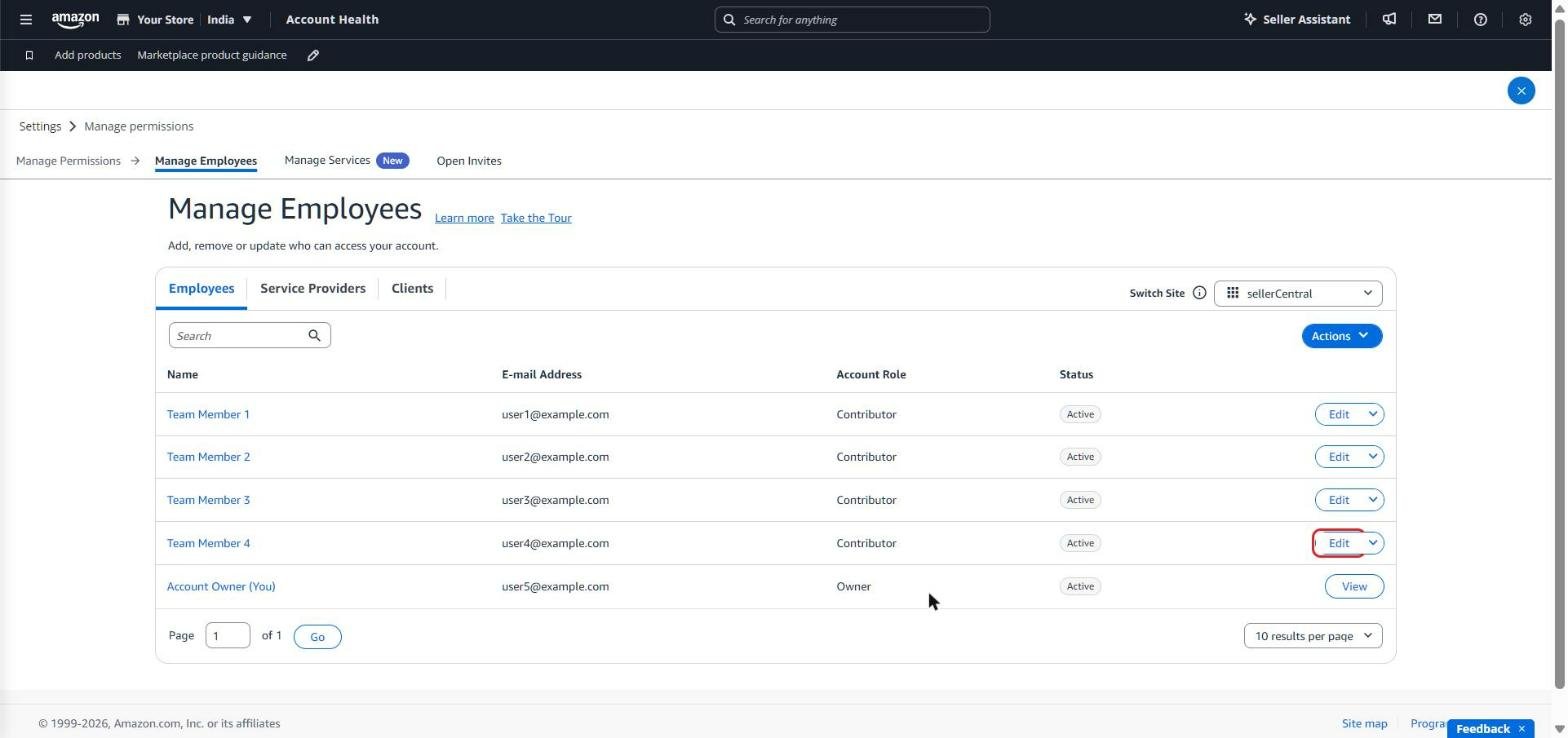
    Step 5: After they accept, click Edit

    Once the invitation is accepted, the user appears in Manage Employees as a Contributor. Click Edit next to their name.

    Employees list in Amazon Seller Central with the Edit button highlighted
    Step 5: Click Edit next to the new user

    Step 6: Choose a role (Manager) and click “Add All”

    At the top of Edit User Permissions, Amazon offers ready-made roles: Generalist, Fulfilment, Advertising, Content, Customer Service, Executive and Manager. Click the role that fits the job. A dark banner appears. Click Add All to apply every recommended permission at once.

    Edit User Permissions with the Manager role selected and the Add All button
    Step 6: Select a role → Add All

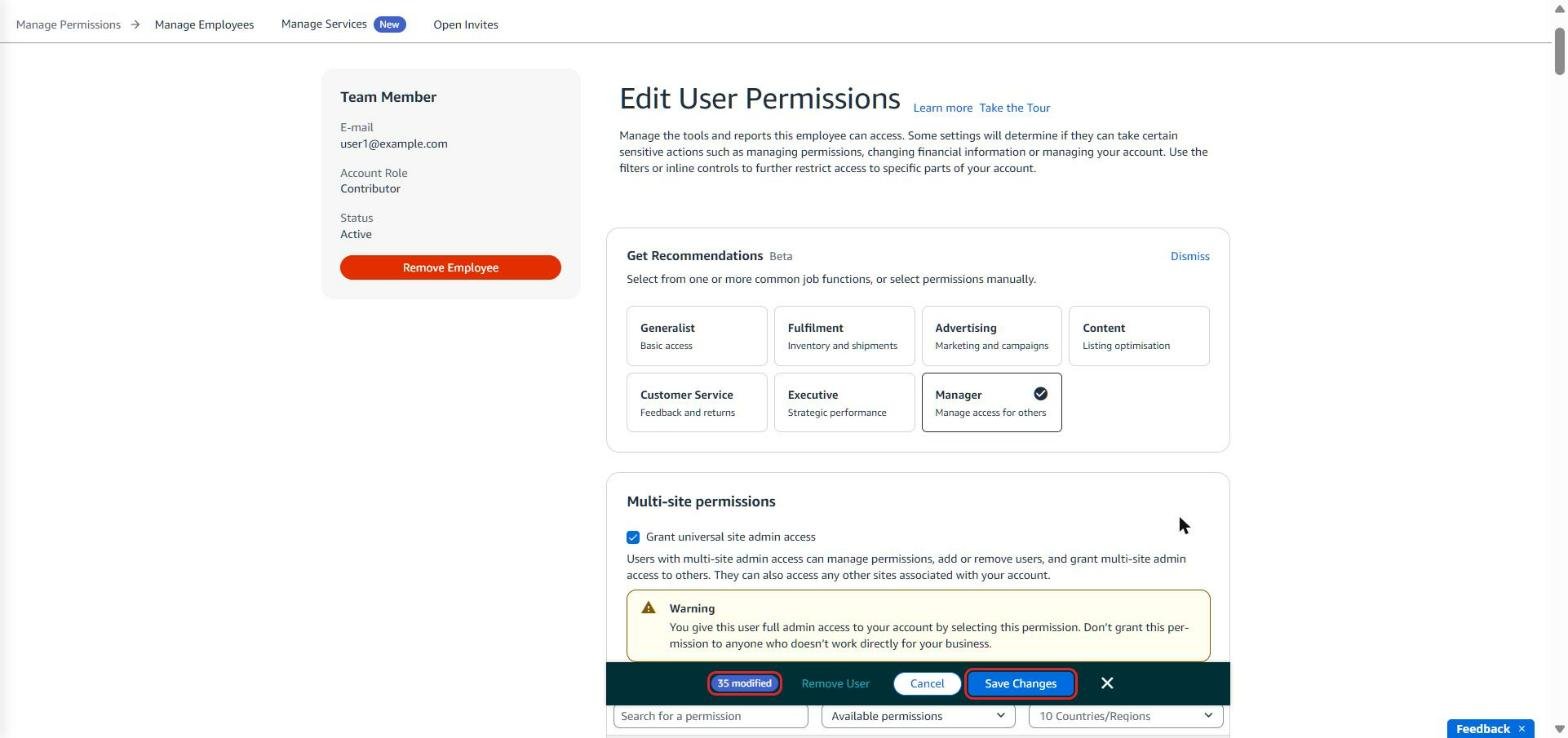
    Step 7: Review and click Save Changes

    The bottom bar shows how many permissions changed (for example 35 modified). Click Save Changes. Done. The user can now log in with their own account.

    Save Changes bar with modified count and the universal site admin access warning
    Step 7: Review → Save Changes

    Important: Manager → Add All also ticks Grant universal site admin access. That is full admin, so the user can manage other users too, and Amazon shows a warning. If you want less access, untick it or choose specific permissions instead.

    Seeing “Access Restricted”? Here is the fix

    Since Amazon’s 2026 update, a newly invited user must finish Solution Provider Portal registration and identity verification before you can edit their permissions. Until then you see Access Restricted and their status shows Needs Verification. Send them the “How to Register on Solution Provider Portal” link from the popup and try again once they are verified.

    Access Restricted message asking the user to complete Solution Provider Portal registration
    Access Restricted: the user must finish Solution Provider Portal verification first

    Which permissions does each person need?

    Every permission can be set to None, View, Edit or Admin. View lets them see a page, Edit lets them change it, and Admin also lets them grant it to others.

    PermissionWhat it allowsWho needs it
    Performance → AppealsSee and submit account and listing deactivation appealsReinstatement expert
    Reports → Account HealthAccount Health dashboard and policy violationsReinstatement expert, manager
    Reports → PaymentsBalance, held funds and payoutsAccountant, reinstatement expert
    Settings → Account InformationBusiness and identity information pagesReinstatement expert
    Settings → Manage Your CasesOpen, view and reply to Seller Support casesReinstatement expert, VA
    Settings → Messaging AccessRead and reply to buyer messagesCustomer service, VA
    Orders → TransactionsDownload order reportsAccountant, reinstatement expert
    Settings → Agreements/Amendments“Edit” = legal authority to accept Amazon agreements for youOwner only, in most cases

    How to give access to an Amazon reinstatement expert

    If your account is suspended or deactivated, your reinstatement consultant needs your Account Health, Performance Notifications and appeal history to write an accurate Plan of Action. The fastest way is to invite them as above and give the Manager role. To limit access, give at least: Appeals (Edit), Account Health and Payments (View), Account Information, Manage Your Cases and Messaging Access (Edit), and Transactions (View). You can remove access at any time with Remove Employee.

    New to suspension notices? Read how to read an Amazon suspension notice.

    Real reinstatement results

    These are reinstatement emails from client cases we handled. Every one started with a notice like yours.

    Amazon email confirming a client's seller account was reinstated
    Real Amazon email from a client case
    Amazon email confirming a client's seller account was reinstated
    Real Amazon email from a client case
    Amazon email confirming a client's seller account was reinstated
    Real Amazon email from a client case

    How our fee works

    Reading your notice is free. If we take the case, you pay a small part to start and the rest only when you are selling again.

    $150To start: our full investigation ($200 for complex cases). Non-refundable.
    $350Only after your account is reinstated ($400 for complex cases).

    Complex cases are Section 3, counterfeit, related accounts, review manipulation and dropshipping. See our Amazon reinstatement cost guide for how pricing works across the industry.

    Frequently asked questions

    Can I add more than one user to Amazon Seller Central?

    Yes. Invite people one by one with Invite Employee, or several at once with Send Bulk Invitations. Each person gets their own login and permissions.

    Why can’t I edit a new user’s permissions?

    Amazon now requires invited users to finish Solution Provider Portal registration and identity verification. Until they do, you see “Access Restricted” and their status shows Needs Verification.

    Is it safe to give someone access to my Seller Central account?

    It is much safer than sharing your password. Every action is tied to their own login, you choose what they can access, and you can remove them at any time. Only give full admin (universal site admin access) to people you fully trust.

    How do I remove a user from Seller Central?

    Go to Settings → Manage permissions → Manage Employees, click Edit next to the user, then Remove Employee. You can also use the arrow next to Edit → Remove user.

    What is the difference between View, Edit and Admin?

    View lets the user see a page, Edit lets them make changes, and Admin also lets them grant that permission to other users.

    Need help with a suspended account?

    Add us as a user using the steps above. Our appeals team reviews your Account Health and notices for free and tells you honestly what it will take.

    SellerReinstatement Appeals Team

    The SellerReinstatement appeals team has handled Amazon seller account reinstatement cases since 2014 across every Amazon marketplace. Every guide comes from real cases.

  • How to Read an Amazon Suspension Notice

    How to Read an Amazon Suspension Notice

    An Amazon suspension notice tells you more than it seems to, if you know where to look. This guide walks through each part of an Amazon suspension notice, explains the wording Amazon uses, and shows how our appeals team turns a notice into a clear plan before anything is sent.

    By SellerReinstatement Appeals TeamUpdated November 20268 min read

    Quick answer

    To read an Amazon suspension notice, find four things: the level (one listing or the whole account), the policy Amazon names, the evidence it points to (ASINs, order IDs, complaints), and what it asks for (documents, a Plan of Action, or both). Check the same notice in Account Health before you write anything.

    Real Amazon reinstatement email from one of our client cases, shared with the client's permission
    Real result Amazon email from one of our client cases, shared with permission. Tap to view full size.

    Key takeaways

    • Read the notice in Seller Central Account Health, not only the email.
    • First decide: is it one listing, a selling privilege, or the whole account?
    • The policy name tells you what kind of appeal Amazon expects.
    • Some notices need documents, some need a Plan of Action, some need both.
    • Do not reply to the email, open a new account or appeal in a rush.

    Not sure what your notice means?

    Send it to us for a free review. Our appeals team tells you honestly what we see before you pay anything.

    Where to find your Amazon suspension notice

    Amazon usually sends the notice in two places: an email to the address on your seller account, and a message in Seller Central. The Seller Central version is the one that matters, because it sits next to the appeal option and lists any documents Amazon wants.

    • Account Health (Performance menu): the policy, the affected ASINs and the appeal button.
    • Performance Notifications: the full text of every notice, with dates.
    • Your email inbox: check spam folders, and confirm the sender is really Amazon before you click anything.
    • Earlier warnings: older notices often explain what the latest one is about.

    The 4 parts of every Amazon suspension notice

    Most notices follow the same pattern, even when the wording changes. Read them in this order.

    PartWhat it tells youWhat to do with it
    1. LevelWhether Amazon removed one listing, restricted a category or brand, held funds, or deactivated the whole account.Listing-level problems are usually faster to fix. Account-level ones need a full appeal.
    2. PolicyThe rule Amazon believes was broken, such as inauthentic, IP, restricted products, performance or Section 3.Match your appeal to this policy. A good appeal for the wrong policy still fails.
    3. EvidenceASINs, order IDs, buyer complaints, rights owner details or a linked account.List every item Amazon names. Your appeal must answer each one.
    4. The askDocuments, a Plan of Action, a video call, or information Amazon wants verified.Send exactly what is asked, in a format that matches your Seller Central details.

    Got a notice you can’t make sense of? Tap the green WhatsApp icon on your screen and send it to us. Reading it is free.

    Common Amazon notice wording, decoded

    Amazon does not use one fixed template, but these phrases come up again and again in the notices our clients send us. Here is what they usually mean.

    Typical wordingWhat it usually means
    Your selling account has been deactivatedAccount level. Listings are inactive and funds may be held until the case is resolved. See deactivated vs suspended.
    Your account is at risk of deactivationA warning. You still have time to fix the cause before it becomes a deactivation.
    We received complaints that items are inauthenticSupply chain proof is needed, usually supplier invoices. See our inauthentic suspension guide.
    Your account or a related accountSection 3 or related account language. Amazon may not say which account it means. See our Section 3 guide.
    We could not verify the information you providedA verification problem, fixed with matching documents rather than a Plan of Action. See verification and funds.
    Your account did not meet our performance targetsPerformance case: order defects, late shipments or cancellations. See our performance Plan of Action sample.

    What Amazon is really asking for

    Every notice falls into one of three types of request. Getting this right decides what you prepare.

    Documents only

    Identity, address, bank and business verification cases. Amazon wants documents where the name and address match Seller Central exactly. A long explanation does not help here.

    A Plan of Action

    Policy and performance cases. Amazon wants the root cause, the corrective actions you have already taken and the preventive measures you will keep. Our Amazon Plan of Action template shows the structure.

    Both

    Inauthentic, IP and restricted products cases often need a Plan of Action plus proof, such as invoices, authorization letters or test reports.

    When your Amazon suspension notice is vague

    Some notices, especially Section 3 and related account cases, give very little detail. That does not mean the case is hopeless. It means you need to find the cause yourself before you write.

    • Check Account Health for every open policy violation and its date.
    • Read recent buyer messages, returns and product reviews.
    • List every outside service you used: review tools, agencies, prep centers.
    • Think about shared devices, addresses, bank accounts or family accounts.

    If you still cannot see the reason, do not guess in your appeal. A wrong root cause is one of the most common reasons appeals get rejected. Our guide on what to do when an appeal is rejected explains why.

    Your first 48 hours after the notice

    Do thisAvoid this
    Save the full notice text and take screenshots of Account Health.Replying to the notice email or opening many Seller Support cases.
    Collect invoices, IDs and documents that match your account details.Sending a quick appeal the same day without fixing anything.
    Fix or remove the listings Amazon named.Opening a new seller account while this one is deactivated.
    Get a second opinion on the notice before you submit.Copying a template that does not match your notice.

    For more on who to contact and when, read how to contact Amazon about a suspended account.

    Real reinstatement results

    These are reinstatement emails from client cases we handled. Every one started with a notice like yours.

    Amazon email confirming a client's seller account was reinstated
    Real Amazon email from a client case
    Amazon email confirming a client's seller account was reinstated
    Real Amazon email from a client case
    Amazon email confirming a client's seller account was reinstated
    Real Amazon email from a client case

    How our fee works

    Reading your notice is free. If we take the case, you pay a small part to start and the rest only when you are selling again.

    $150To start: our full investigation ($200 for complex cases). Non-refundable.
    $350Only after your account is reinstated ($400 for complex cases).

    Complex cases are Section 3, counterfeit, related accounts, review manipulation and dropshipping. See our Amazon reinstatement cost guide for how pricing works across the industry.

    Frequently asked questions

    Where do I find my Amazon suspension notice?

    Amazon sends it by email and also shows it in Seller Central under Performance, Account Health, and in Performance Notifications. Read the Seller Central version, because it shows the appeal button and any documents Amazon is asking for.

    What if my notice does not explain the reason clearly?

    Vague notices are common, especially for Section 3 and related account cases. Check Account Health for policy violations, recent complaints, ASINs and order IDs, and review any outside tools, agencies or accounts linked to your business. Our appeals team reads notices for free.

    Does every notice need a Plan of Action?

    No. Verification and document requests usually need the right documents, not a Plan of Action. Policy and performance cases usually need a Plan of Action that explains the root cause, what you fixed and how you will prevent it.

    Should I reply to the notice email?

    Usually no. Most notice emails come from an address that does not accept replies. Appeal through Account Health in Seller Central, where Amazon tracks your case.

    How much does help with an Amazon notice cost?

    Reading your notice is free. Standard cases cost $150 to start (non-refundable) and $350 only after reinstatement. Complex cases such as Section 3, counterfeit, related accounts, review manipulation or dropshipping cost $200 to start and $400 after reinstatement.

    Send us your notice for a free review

    Our appeals team reads it and tells you honestly what we see, and what Amazon is likely to want.

    SellerReinstatement Appeals Team

    The SellerReinstatement appeals team has handled Amazon seller account reinstatement cases since 2014 across every Amazon marketplace. Every guide comes from real cases.