Category: All Marketplaces

Amazon seller guides that apply on every Amazon store: appeals, Account Health, listings, feedback and how Seller Central works. Where a rule differs by country, the guide says so.

  • Amazon Seller Support Email Addresses by Marketplace (US, UK, India, UAE and More): Which Official Address Is for What

    Which Amazon email addresses are official, what each one is for, and why most problems (appeals included) have no email route at all. Every address below comes from an Amazon help page or an Amazon email we received.

    By SellerReinstatement Appeals TeamUpdated November 20267 min read

    Quick answer

    Amazon publishes only a few seller email addresses, each for one job: disbursement-appeals@amazon.<marketplace> for withheld funds after a deactivation that was not reinstated, and pricing-error-feedback@amazon.com for feedback on the pricing error policy. There is no email for appealing a suspension: that goes through Account Health > Reactivate your account. Last checked 22 Nov 2026.

    Key takeaways

    • Account appeals have no email route: use Account Health > Reactivate your account.
    • disbursement-appeals@ addresses are for withheld funds only, per marketplace (G9RA9LYBJ3QP27M6).
    • pricing-error-feedback@amazon.com is for policy feedback, not reinstatement.
    • Every address here has a source and a last-checked date; Amazon changes them.

    Not sure which route fits your notice?

    Send us the notice text. We check it free and tell you the correct route — appeal, funds request or listing fix.

    The short version

    Amazon handles almost every seller problem inside Seller Central, not by email. Account and listing appeals go through Account Health, and most other questions go through Seller Support (Help > Get support). Only a few Amazon help pages publish an email address for sellers, and each one has one narrow job. This page lists only those addresses: each one was read on an official Amazon Seller Central help page (page ID beside it) or seen as the sender of an Amazon email in our own work. We do not list addresses copied from blogs, agencies or forums.

    Last checked: 22 Nov 2026. Amazon changes addresses and pages without notice, so open the help page ID in your own Seller Central before you write.

    Withheld funds after deactivation: disbursement-appeals addresses by marketplace

    When an account is deactivated and not reinstated (or no appeal is made), Amazon’s Funds disbursement eligibility policy lets the seller ask separately for the withheld balance by email. The policy page gives the waiting time: on the pages we read it is 60 days from the date the account was deactivated. Amazon then runs its own check and may ask for documents on identity, bank account and product sourcing. Note the spelling: disbursement-appeals@ (with an s), then the marketplace domain.

    MarketplaceAddressWhere Amazon publishes it
    Amazon.com (US)disbursement-appeals@amazon.comFunds disbursement eligibility policy (G9RA9LYBJ3QP27M6)
    Amazon.ca (Canada)disbursement-appeals@amazon.caFunds disbursement eligibility policy (G9RA9LYBJ3QP27M6)
    Amazon.co.uk (UK)disbursement-appeals@amazon.co.ukFunds disbursement eligibility policy (G9RA9LYBJ3QP27M6)
    Amazon.de (Germany)disbursement-appeals@amazon.deFunds disbursement eligibility policy (G9RA9LYBJ3QP27M6)
    Amazon.es (Spain)disbursement-appeals@amazon.esFunds disbursement eligibility policy (G9RA9LYBJ3QP27M6)
    Amazon.in (India)disbursement-appeals@amazon.inFunds disbursement eligibility policy (G9RA9LYBJ3QP27M6)
    Amazon.ae (UAE)disbursement-appeals@amazon.aeFunds disbursement eligibility policy (G9RA9LYBJ3QP27M6)
    Amazon.co.jp (Japan)disbursement-appeals@amazon.co.jpFunds disbursement eligibility policy (G9RA9LYBJ3QP27M6)
    Amazon.com.au (Australia)disbursement-appeals@amazon.com.auFunds disbursement eligibility policy (G9RA9LYBJ3QP27M6)

    What to know before you write:

    • This email is for funds only. It is not an appeal to reinstate the account, and it does not replace the appeal in Account Health.
    • Write from the email address registered on the seller account, give the merchant (seller) name and the deactivation date, and keep identity, bank and supplier documents ready; Amazon says it may ask for them.
    • Amazon can keep some or all funds if it finds deceptive, fraudulent or illegal activity, or repeated policy violations (same policy page). If the account is reinstated on appeal, funds are released on the normal schedule and no funds email is needed.
    • For other EU stores (France, Italy and others), open G9RA9LYBJ3QP27M6 in that store’s Seller Central to see its address.

    Full guide: Amazon holding your funds after deactivation: the 60-day appeal.

    Pricing error policy feedback: pricing-error-feedback@amazon.com

    Amazon’s Marketplace Pricing Error Policy (G5TUVJKZHUVMN77V, read on Seller Central India) says: sellers can reach out to Seller Support to appeal against offer suppression, and for feedback on the policy they can write to pricing-error-feedback@amazon.com.

    • Use it to give feedback on how the policy works, not to get a listing back.
    • To reactivate an offer deactivated for a potential pricing error, correct the price in Pricing Health (or the Account Health row’s “Update Pricing” button). If your price is correct and Amazon still blocks it, open a Seller Support case with proof such as a photo of the printed MRP.

    Step by step: Amazon potential high pricing error: why your listing was deactivated and how to fix it.

    Amazon UK Managing Director’s office: managingdirector@amazon.co.uk

    This address is not on a help page. We list it because it is the sender of an Amazon email we received in our own UK work (November 2026): writing to it returned an automatic acknowledgement within minutes, saying the message had been passed to the relevant department and asking the sender to reply to the same email if there is no answer within 2 business days.

    • It is an escalation contact for a case that has already gone through the normal Seller Central route. It is not a faster or secret way to reinstatement, and the acknowledgement does not mean a decision.
    • Write once, from the registered email, plainly and politely: the merchant name, the case or appeal dates, what Amazon asked for and what you sent. Follow up in the same thread, not with new emails.
    • UK and EU sellers also have Amazon’s mediation scheme for some decisions (help page GG7CAYUTVZKATDUY): who qualifies and the deadlines.

    Where there is no email: the right route for common problems

    ProblemAmazon’s route
    Account deactivatedAccount Health > Reactivate your account; then View Appeal to add information (200370560)
    Listing removed for a policy violationAccount Health > the violation row > Submit appeal, or fix the listing as the row allows (200370560)
    Offer suppressed for a pricing errorPricing Health / Update Pricing; then Seller Support (G5TUVJKZHUVMN77V)
    IP complaint from a rights ownerThe rights owner’s contact is given in the warning; a retraction from them can reinstate the content (G201361070)
    Negative seller feedbackFeedback Manager > Request removal (G20231, G761)
    Identity or document verificationUpload through Seller Central only; Amazon says it accepts documents only through Seller Central

    Before anything else, read the notice itself: how to read an Amazon suspension notice.

    How our fee works

    An email to the wrong address usually costs a week. If your account is deactivated, your funds are held, or a listing keeps getting refused, we can read the notice and the account history with you and tell you the right route. The first check is free; reinstatement fees are shown below.

    $150To start: our full investigation ($200 for complex cases). Non-refundable.
    $350Only after your account is reinstated ($400 for complex cases).

    Tap the WhatsApp icon on your screen to start. The first account check is free.

    Frequently asked questions

    Is there an email address to appeal an Amazon seller account suspension?

    No published one. Amazon’s appeal route for a deactivated account is Account Health > Reactivate your account in Seller Central (help page 200370560). Emails to other Amazon addresses do not replace that appeal.

    What is the Amazon seller support email ID for India or the UAE?

    Amazon does not publish a general Seller Support email for India, the UAE or the US. Seller Support works through cases: Seller Central > Help > Get support. The addresses Amazon does publish are narrow, such as disbursement-appeals@amazon.in and disbursement-appeals@amazon.ae for withheld funds after a deactivation (G9RA9LYBJ3QP27M6).

    Is it disbursement-appeal@ or disbursement-appeals@?

    On every Amazon funds policy page we read (US, Canada, UK, Germany, Spain, India, UAE, Japan, Australia) the address is disbursement-appeals@ with an s, followed by that marketplace’s Amazon domain.

    What is the disbursement-appeals email for?

    Only for asking for withheld funds after an account was deactivated and not reinstated. Amazon’s Funds disbursement eligibility policy (G9RA9LYBJ3QP27M6) gives one address per marketplace and a waiting period (60 days from deactivation on the pages we read).

    When can I email Amazon about withheld funds?

    After the waiting period on your marketplace’s funds policy page, counted from the deactivation date. On the US, UK, Spain, India and UAE pages we read it is 60 days.

    What is pricing-error-feedback@amazon.com?

    An address on Amazon’s Marketplace Pricing Error Policy (G5TUVJKZHUVMN77V) for feedback on the policy. To appeal an offer suppression, the same page points to Seller Support; the usual fix is correcting the price in Pricing Health.

    Does emailing managingdirector@amazon.co.uk get an account reinstated?

    Nobody can promise that. In our experience it returns an automatic acknowledgement and passes the email to a department. Use it only as a calm escalation after the normal Seller Central route, with your facts in one message.

    Why does this page list so few addresses?

    We only list an address we read on an official Amazon help page or saw as the sender of an Amazon email ourselves. Many addresses passed around online are old or unofficial, and writing to the wrong one wastes time.

    Do Amazon email addresses change?

    Yes. Amazon updates help pages without notice. Each address here shows its help page ID and the date we last checked it; open that ID in your own Seller Central before writing.

    Account deactivated or funds held?

    Get a free account check from our team before you write to Amazon.

    SellerReinstatement Appeals Team

    The SellerReinstatement appeals team has handled Amazon seller account reinstatement cases since 2014 across every Amazon marketplace. Every guide comes from real cases.

  • How to Remove Negative Feedback on Amazon as a Seller: What Amazon Removes and How to Ask

    You clicked “Request removal” and Amazon said the feedback “does not meet our criteria”. Usually the reason picked was wrong, or the comment is one Amazon will never touch. Here is exactly what Amazon removes, which reason to choose, and what to do when removal is not possible.

    By SellerReinstatement Appeals TeamUpdated November 20269 min read

    Quick answer

    Amazon removes seller feedback only when it contains obscene language, hate speech or personal information, mentions another seller’s product, or is entirely a product review. It strikes feedback through when the whole comment is about delivery or service on an order fulfilled by Amazon (FBA), or about a late order you shipped on time with Amazon’s shipping. You ask in Feedback Manager within 90 days, by picking the one reason that is true. Asking through Contact Us can put your account at risk.

    Key takeaways

    • Removed and struck through are different results, but both take the feedback out of your Order Defect Rate.
    • The reason you choose has to match the whole comment. A mixed comment (product plus service) is usually refused.
    • On FBA orders, delivery complaints, and even a wrong item sent from Amazon’s stock, were removed with the “Order was fulfilled by Amazon” reason.
    • A refused request can be appealed from Manage Review Requests, before the deadline shown.
    • Never ask the buyer to remove feedback, never offer anything for it, and never use Contact Us for removal.
    • Request removal first. If it cannot come off, post a short public reply: no negative feedback should stay unanswered.

    Is your account already At Risk?

    If negative feedback has pushed your Order Defect Rate near 1%, or Amazon keeps refusing your removal requests, send us a screenshot of Account Health and Feedback Manager on WhatsApp. Within 24 hours we tell you, free, which feedbacks can come off under Amazon’s own rules and what else is putting the account at risk.

    Amazon feedback removal guidelines: what it removes and what it only strikes through

    Amazon’s seller feedback help page (G20231 in Seller Central) gives two kinds of result. Know which one you are asking for before you click.

    ResultWhen Amazon does itWhat buyers seeCounts in ODR?
    RemovedObscene or profane language; hate speech; personal information (phone number, email, full name); a comment about a product sold by a different seller; the entire comment is a product reviewThe feedback disappearsNo
    Struck throughThe entire comment is about delivery or customer service on an order fulfilled by Amazon; or about a late or undelivered order you shipped on time with Amazon’s shipping serviceA line through the comment and a note that Amazon takes responsibilityNo
    StaysAnything about your own service, packing, a wrong or missing item you shipped, refunds or priceThe feedback stays liveYes

    One word decides most cases: entire. If a comment says “the cream is sticky and the seller never replied”, it is not entirely a product review, because half of it is about you. Amazon’s page says that when a comment holds both a product review and feedback about your service, the feedback is not removed.

    The window matters too. You can ask for removal within 90 days of the date the feedback was left. After that the option is blocked. Buyers themselves can remove their feedback within 60 days.

    How to request removal of negative feedback, step by step

    1. In Seller Central go to Performance > Feedback (Feedback Manager). This is the only feedback removal link Amazon accepts.
    2. Find the negative or neutral feedback. Note the order ID and the date it was left.
    3. Open the order and check the fulfilment channel. “Fulfilled by Amazon” opens the FBA route. “Seller” means only the content-based reasons apply.
    4. Read the comment word by word against the table above. Decide which single reason is true.
    5. In the row’s Choose one menu, select Request review (shown as Request removal on some marketplaces).
    6. Pick the reason. On Amazon.in the menu offers: Inappropriate Feedback, Product Feedback, Delivery related feedback (with “Order was fulfilled by Amazon” or “Order was shipped using Amazon shipping services”), and My reason is not listed.
    7. Submit. The form is mainly a reason drop-down (G761 mentions an optional comments field that may not show on your account), so there is no “removal request template” to write: the reason you pick is your whole argument. Decisions often arrive within minutes, as a case in Manage Your Cases and in the Manage Review Requests tab.

    Which reason to pick: what was accepted and what was refused

    Because the form is mainly a reason drop-down, the reason does most of the work. From the requests we filed on accounts we manage in November 2026:

    • FBA delivery complaint (“not delivered yet”, “arrived late”) → Delivery related feedback > Order was fulfilled by Amazon. Removed within about a minute.
    • Wrong or different item on an FBA order → the same FBA reason was accepted. On an FBA order Amazon picks and packs from its own stock.
    • “About the product itself” (Product Feedback) was refused twice when the comment said or implied that the seller sent a wrong or fake item. Amazon reads that as a complaint about the seller, not a product review.
    • Pure product comment (“taste is bad”, “didn’t work for me”, “size runs small”) with nothing about delivery or service → Product Feedback is the true reason.

    Pick one honest reason. Choosing “Product Feedback” for a comment about a wrong item you shipped yourself is a false claim, and it will be refused.

    Finding the gap: what worked on one account we manage

    In November 2026 we reviewed every 1-star feedback from the last 90 days on one Amazon.in account we manage. There were 13.

    OutcomeCountTypical comment
    Already struck through by Amazon, no request needed6“Parcel not delivered”, “shows delivered but not received” on FBA or Amazon-shipped orders
    Removed after our request1“Not delivered yet” on an FBA order, removed within about a minute
    Not eligible, answered with a public reply6Wrong item, other brand, wrong size, “fake product” on orders the seller shipped

    The one removal cut the account’s FBA order defect rate in half, from 0.06% to 0.03%.

    • Check the fulfilment channel first. A delivery complaint on an FBA order is Amazon’s responsibility, and that is the fastest win there is.
    • Look for what Amazon already did. Many delivery complaints are struck through automatically. Do not spend a request on them.
    • Be honest about the rest. A wrong or different item that you packed and shipped is about you. It will not come off, and the real fix is making what you pack match the listing.
    • Log every request. Write down the comment, the reason you chose and Amazon’s answer. After a few weeks you know which reasons Amazon accepts on your account.

    Amazon feedback removal request denied? What to do next

    A refusal is not the end if your reason was true. Go to Feedback Manager > Manage Review Requests, find the request marked Denied and use Appeal Decision before the deadline shown there (after it, the request cannot be reopened). In the appeal, quote the comment and name the exact rule it meets. For example: “The entire comment is about the product’s taste. It does not mention delivery, packing or our service, so it falls under the product review rule.”

    If the comment is abusive, threatening or contains personal details, you can also use Report a violation on the feedback.

    The two mistakes that cost accounts

    Mistake 1: using Contact Us or a support case for feedback removal. Many older guides tell sellers to open a case. Amazon’s current help pages say removal requests must go through Feedback Manager and that using other channels may lead to account deactivation. Do not take that risk for one comment.

    Mistake 2: asking the buyer to remove it. Amazon’s buyer communication rules forbid asking a buyer to remove or change feedback, and forbid offering a refund, gift or discount in return. You may solve the buyer’s problem. If they then remove the feedback, that is their own decision.

    When removal is not possible: how to respond to negative feedback in public

    Request removal first. Only when the feedback cannot come off, post a public reply in Feedback Manager. Future buyers read it, and it shows how you handle problems. The reply screen has its own rules:

    • At most 400 characters.
    • No personal details of the buyer or anyone else.
    • No questions: the buyer cannot answer a public reply.
    • It cannot be edited once posted, so read it twice.
    • It disappears if the feedback is later removed.

    Keep it calm and factual. Say only what is true and already done. Example for a late seller-fulfilled order: “We are sorry this order reached you late. It was delayed in transit. If anything is still wrong with it, please message us through Amazon and we will help.” If a delay came from outside events, Amazon’s own page suggests a public reply that says so.

    Why it matters: your Order Defect Rate

    Negative feedback (1 or 2 stars) is one of the three parts of the Order Defect Rate, with A-to-z claims and chargebacks. Amazon’s target is under 1%. On a small account, two negative feedbacks in 60 days can push a seller over the line and put seller-fulfilled offers at risk. Every removal or strike-through comes straight off that number. See our guide to what counts in the Order Defect Rate, and why being in Account Health Assurance does not make an account safe from deactivation.

    A daily routine that keeps feedback under control

    • Check Feedback Manager every day for new 1 to 3 star ratings. A feedback missed for 90 days can never be challenged.
    • Open each order and note FBA or seller-fulfilled.
    • Request review only where one reason is clearly true.
    • Appeal refusals that were wrongly decided, quoting the rule.
    • Post a public reply on everything that stays.
    • Fix the cause: stock and listing match, packing, carrier, response time.

    How our fee works

    Feedback removal is not sold on its own. It is part of our account management, where we run the account every day: feedback removal and public replies, ODR, late dispatch and tracking, listing issues, cases with Amazon and sales growth. If the account is already deactivated, our reinstatement fee works like this:

    $150To start: our full investigation ($200 for complex cases). Non-refundable.
    $350Only after your account is reinstated ($400 for complex cases).

    Tap the WhatsApp icon on your screen to start. The first account check is free.

    Frequently asked questions

    How do I remove negative feedback on Amazon as a seller?

    In Feedback Manager (Performance > Feedback), choose Request review on the feedback and pick the one reason that is true: inappropriate content, product feedback, or delivery related feedback on an FBA or Amazon-shipped order. Do it within 90 days.

    What are Amazon’s feedback removal guidelines?

    Amazon removes feedback with obscene language, hate speech or personal information, feedback about another seller’s product, and feedback that is entirely a product review. It strikes through feedback that is entirely about delivery or service on an FBA order, or about a late order shipped on time with Amazon’s shipping.

    Is there an Amazon feedback removal request template?

    No. The form is mainly a reason drop-down. Amazon’s help page G761 mentions an optional comments field, but it may not show on your account. You only pick a reason, so choosing the reason that matches the whole comment is what decides the result.

    Amazon denied my feedback removal request. Can I try again?

    Yes. Open Manage Review Requests, find the denied request and use Appeal Decision before the deadline shown, quoting the rule the comment meets. After the deadline it cannot be reopened.

    Can I message the buyer and ask them to remove it?

    No. You can help solve the problem, but asking for removal or offering anything in return breaks Amazon’s rules.

    Should I reply to negative feedback in public?

    Yes, but request removal first. A public reply is limited to 400 characters, cannot be edited, must not contain personal details or questions, and disappears if the feedback is removed.

    Does a struck-through feedback still hurt my account?

    No. A struck-through feedback does not count in your Order Defect Rate or your feedback rating.

    Want us to check your feedback and account health?

    Send a screenshot of Account Health and Feedback Manager. You get an honest answer before you pay anything.

    SellerReinstatement Appeals Team

    The SellerReinstatement appeals team has handled Amazon seller account reinstatement cases since 2014 across every Amazon marketplace. Every guide comes from real cases.

  • Lost the Buy Box on Amazon? Seller Eligibility Ended in September 2026 — The 7-Step Featured Offer Check

    Your listing is live, the price looks fine, yet another seller holds the Add to Cart button — or no one does. Since September 2026 Amazon no longer keeps a seller-level Buy Box eligibility requirement, so the answer is almost always in the offer itself. Here is how Amazon says it picks the Featured Offer, and the order we check things in.

    By SellerReinstatement Appeals TeamUpdated November 20268 min read

    Quick answer

    Amazon removed the seller-level “Featured Offer eligibility” requirement in September 2026: offers from all sellers are now evaluated for the Buy Box. If your offer is not featured, check it in this order — in stock, shippable to the customer, any Pricing Health high-price flag, total price (item + shipping) against the Featured Offer price, free shipping, a specific delivery promise, and Voice of the Customer complaints. Star ratings, the Prime badge and FBA vs FBM are not factors.

    Key takeaways

    • Amazon’s own page now says it “no longer maintains a seller eligibility requirement” for the Featured Offer (since September 2026).
    • Price means total price: item price plus shipping. A free-shipping offer can beat a cheaper offer that charges shipping.
    • An out-of-stock offer, or one not shippable to the customer’s area, cannot be featured.
    • A Pricing Health “significantly high price” flag keeps the offer out of the Buy Box until the price is fixed.
    • Customer reviews, star ratings, the Prime badge and FBA vs FBM are not Featured Offer factors. Voice of the Customer complaints and chargebacks are.
    • Amazon says it never uses manual overrides — there is no Buy Box appeal; you fix the offer.

    Want us to check your account?

    Send us your notice for a free case review. You get an honest answer before you pay.

    What changed in September 2026

    For years Seller Central had a help page called “Featured Offer eligibility”. Sellers who did not meet Amazon’s performance bar for the account could not win the Buy Box on any listing, and many sellers still believe this.

    That page has now been removed. On Seller Central India, the old eligibility page reads: “As of September 2026, Amazon no longer maintains a seller eligibility requirement, and offers from all sellers are now eligible to be evaluated for the Featured Offer.” The older general Featured Offer page is also marked removed and points sellers to the current page, “Becoming the Featured Offer”.

    What this means in practice: if your offer is not featured, do not go looking for an account switch that no longer exists. Look at the offer — stock, shipping, price, delivery promise and complaints on that product.

    What the Buy Box (Featured Offer) is

    The Featured Offer — still called the Buy Box by most sellers — is the offer a shopper buys when they press Add to Cart or Buy Now on the product page. Amazon evaluates all offers on the product and features the one it considers most attractive for the customer. Where no offer is clearly better, Amazon says the Featured Offer “could be a rotation of the best offers”, which is why the Buy Box can move between sellers through the day.

    The Featured Offer is decided separately for each variation (size, colour) and can differ by the customer’s shipping location and whether they are a Prime member. So you can hold it for one shopper and not for another.

    What Amazon uses to pick the Featured Offer

    Amazon’s “Becoming the Featured Offer” page lists these factors:

    • Price. Amazon considers both the item price and the shipping price. Coupons and promotions can help.
    • Free shipping. Amazon’s own example: an offer at 40 with free shipping is preferable to an offer at 35 plus 5 shipping. A cart-level fee, an item-level fee, or a free-shipping threshold the order does not meet all count as “not free”.
    • Delivery promise. A specific delivery date beats a wide range. A narrower promise helps.
    • Seller performance on the offer. Order volume (Amazon says it takes steps so smaller sellers are not disadvantaged), chargeback rate, and Voice of the Customer complaints — damaged, defective, wrong item, missing parts, inaccurate description, wrong size or style, condition, expiry date issues.
    • Stock and reach. “Your offer cannot become featured if you are out of stock”, and the offer must be shippable to the customer.

    Amazon also says: “We rank offers the same way for every product and we never use manual overrides to select one offer over another.”

    What Amazon says it does not use

    • Customer reviews and star ratings are not a Featured Offer factor. Removing a negative seller feedback is still worth doing for your Order Defect Rate, but it will not by itself win back the Buy Box.
    • The Prime badge is not a factor on its own.
    • FBA vs FBM: Amazon states that offers fulfilled by Amazon or by the merchant are equally likely to be featured. A fast, specific, free delivery promise is what matters.

    Lost the Buy Box? The 7-step check

    This is the order we work through on the accounts we manage. Each step can stop the offer on its own, so fix the first failing step before moving on.

    1. Is the offer in stock? Zero sellable units means no Buy Box. For FBA, check that units are sellable, not inbound, reserved or unfulfillable.
    2. Is it shippable to the customer? Check that the shipping template covers the regions or PIN codes your buyers are in. An offer that cannot ship to a shopper’s address is not shown to them.
    3. Any Pricing Health flag? Open Pricing > Pricing Health. A row saying the offer is “not eligible to be the Featured Offer due to significantly high price”, or deactivated for a potential pricing error, must be fixed first. See our guide on the potential high pricing error.
    4. Total price vs the Featured Offer price. Add your item price and shipping and compare with the Featured Offer price shown on Pricing Health. Being a little above can be enough to lose it.
    5. Make shipping free. Where margins allow, fold the shipping fee into the item price. Amazon’s own example shows free shipping winning over a lower item price plus a fee.
    6. Tighten the delivery promise. Reduce handling time and give a specific date rather than a wide window.
    7. Clear Voice of the Customer complaints. Open Voice of the Customer for the ASIN. Wrong item, expired stock, missing parts and “not as described” complaints count against the offer — fix the cause (listing text, packing, stock check), not only the single order.

    “No featured offers available”: when nobody wins

    Sometimes the product page shows “See all buying options” and no seller holds the Buy Box at all. Amazon’s page explains that it “will not feature any offer if none of the available offers meet our customer experience requirements, even if the product has only one available offer.”

    If you are the only seller and there is still no Buy Box, check three things first: is the offer shippable to the area, is it in stock, and what does Pricing Health say about the price. Pricing Health is usually the quickest place to find the cause — for example an offer priced well above its recent selling prices.

    If you believe a reference price Amazon uses is wrong or out of date, Seller Central has a self-service route: Help > Get help and resources > Featured Offer > enter the ASIN and SKU > create a case. Amazon’s Pricing Health help says this can resolve in about 30 minutes.

    Repricers, minimum and maximum prices

    Many sellers turn on Automate Pricing to chase the Buy Box. Two rules on Seller Central India are worth knowing before you do:

    • “Amazon uses the same minimum and maximum prices throughout Seller Central” — the minimum and maximum you set in Automate Pricing apply even when you are not repricing. A price outside them can suppress the offer. Check them under Pricing > Manage Pricing > Preferences (show the Minimum and Maximum Price columns).
    • The minimum must be above the category’s minimum referral fee, and the maximum must stay under six times the ASIN’s recent sales price. On Amazon.in, Amazon adds that the maximum price “should not exceed the MRP of the product”.

    The pre-defined “Competitive Price rule by Amazon” matches the Featured Offer price for the same ASIN and condition. It will follow competitors all the way down to your minimum, so set a minimum that still leaves a profit.

    Featured Offer percentage: how to measure it

    In Business Reports, Featured Offer percentage = the page views where your offer was featured ÷ total page views of the product. Watch it per child ASIN after each change, rather than refreshing the product page — what you see there depends on your own location and Prime status.

    Common mistakes we see

    • Opening cases asking Amazon to “give back” the Buy Box. Amazon does not use manual overrides. Fix the offer instead.
    • Cutting the item price while keeping a shipping fee. Amazon compares the total. Free shipping at a slightly higher item price often does better.
    • Chasing star ratings for the Buy Box. Ratings are not a factor; complaints on the product are.
    • Running a repricer with no maximum, or a maximum above MRP. This can end in a pricing-error deactivation, which removes the offer completely.
    • Ignoring account health. The Buy Box no longer depends on an account-level eligibility check, but a weak Order Defect Rate or late shipment rate can still lead to deactivation — and a deactivated offer cannot win anything. If listings have already been removed, see listing reinstatement.

    Want a second pair of eyes? Send us a screenshot of Pricing Health and the product page on WhatsApp and we will tell you which of the seven steps is stopping your offer. If you would rather hand over the daily work — pricing checks, stock, feedback, account health and cases — that is what our account management covers.

    How our fee works

    A rejected appeal often needs a fresh look rather than another rewrite. You pay a small part to start, and the rest only when you are selling again.

    $150To start: our full investigation ($200 for complex cases). Non-refundable.
    $350Only after your account is reinstated ($400 for complex cases).

    Tap the WhatsApp icon on your screen to start. The first review of your rejection is free.

    Frequently asked questions

    Did Amazon remove Buy Box eligibility?

    Yes. Amazon’s Seller Central help now says that as of September 2026 it no longer maintains a seller eligibility requirement, and offers from all sellers are eligible to be evaluated for the Featured Offer. Whether an offer is featured is now decided offer by offer.

    Why did I lose the Buy Box on Amazon?

    The usual causes, in order: the offer is out of stock, not shippable to the customer, flagged on Pricing Health for a significantly high price, priced above the Featured Offer on total price (item plus shipping), charging shipping, showing a long delivery window, or collecting Voice of the Customer complaints.

    Does seller feedback or star rating affect the Buy Box?

    Amazon’s Becoming the Featured Offer page says customer reviews and star ratings are not factors. Voice of the Customer complaints and chargebacks are. Feedback still matters for your Order Defect Rate and account health.

    Is FBA more likely to win the Buy Box than FBM?

    Amazon states that offers fulfilled by Amazon or by the merchant are equally likely to be featured. What counts is price, free shipping, a specific delivery promise and the customer experience on the offer.

    What does “No featured offers available” mean on Amazon?

    Amazon will not feature any offer if none meets its customer experience requirements, even when there is only one seller. Check stock, shippable location and Pricing Health — often the price is well above recent selling prices.

    Can I appeal to Amazon to get the Buy Box back?

    There is no Buy Box appeal, because Amazon says it never uses manual overrides. If a reference price is wrong you can raise it through Help > Get help and resources > Featured Offer. Otherwise fix the offer using the 7-step check.

    Want us to check your account?

    Send us your notice for a free case review. You get an honest answer before you pay.

    SellerReinstatement Appeals Team

    The SellerReinstatement appeals team has handled Amazon seller account reinstatement cases since 2014 across every Amazon marketplace. Every guide comes from real cases.

  • Amazon Order Defect Rate, Late Shipment and Cancellation Rate: What Counts and What Does Not (US, UK, Japan, India)

    When Amazon deactivates seller-fulfilled offers for performance, the notice names a metric and a percentage. The faster route is often to check which of your defects should not be counted at all. Amazon’s help pages spell this out.

    By SellerReinstatement Appeals TeamUpdated November 20267 min read

    Quick answer

    Shrink the number first. Feedback a buyer withdraws, A-to-z claims where you were not at fault, fraud chargebacks and customer-requested cancellations do not count. Clear those, then appeal with an order-by-order sheet for the window Amazon named.

    Key takeaways

    • Order Defect Rate target is under 1% over 60 days in every store we checked.
    • Late shipment and cancellation targets differ by marketplace. Use the number in your own notice.
    • A granted A-to-z claim can be appealed within 30 calendar days.
    • Valid Tracking Rate is measured per product category.
    • On some stores a five-question quiz in the Account Health banner can avoid the deactivation.

    Need help with this suspension?

    Send us your notice for a free case review. You get an honest answer before you pay.

    Targets by marketplace

    MetricUSUKJapanIndia
    Order Defect RateUnder 1%Under 1%Under 1%Under 1%
    Late Shipment RateUnder 4%See your noticeSee your noticeRecommended under 2%
    Cancellation RateUnder 2.5%Under 2.5%Under 2.5%Below 2%
    On-Time Delivery RateMinimum 90%Minimum 90%See your noticeAbove 97%
    Valid Tracking Rate95% per categorySee your noticeSee your notice95% per category

    “See your notice” means we did not find a figure on that store’s help page.

    Order Defect Rate: what does not count

    • Feedback the buyer withdraws. It leaves the rate, though it can take up to 48 hours.
    • Feedback Amazon removes: profanity, hate speech, personal information, feedback about another seller’s product, or a comment that is entirely a product review. Mixed product-and-service comments stay.
    • A-to-z claims where you were not at fault, that were denied, or that the buyer withdrew. A claim reversed on appeal is removed.
    • Fraud chargebacks. Only service chargebacks decided for the buyer count.

    The rate is calculated on the order date, not the date the feedback or claim arrived.

    A-to-z claims: the clocks

    • Reply to a delivery complaint within 48 hours.
    • Authorise or answer a return request within 48 hours.
    • Answer Amazon’s request for information within 72 hours.
    • Appeal a granted claim within 30 calendar days.

    For US orders shipped from abroad, an international return address without a prepaid label or a returnless refund is a common reason a claim becomes eligible.

    Late shipment and cancellations

    • An order is late when shipment is confirmed after the expected ship date, even if the parcel left on time.
    • Expected ship dates follow your operating-day settings and public holidays.
    • A cancellation the customer requested through their account is not counted when you cancel with the reason “Buyer Cancelled”.
    • Orders Amazon cancels automatically because you did not ship and confirm in time are counted.

    Valid Tracking Rate

    • Only listings in the category that fell under 95% are suspended.
    • A tracking ID is valid only with at least one carrier scan.
    • A wrong entry can be corrected, but not after the promised delivery date.

    Routes Amazon itself offers

    1. The quiz. On Amazon India and Amazon Japan, an at-risk seller may see a five-question quiz in the Account Health banner. On India, Amazon says passing it means no plan of action is required.
    2. Support tools (US). Some US accounts are asked to enrol in a seller-fulfilled support tool for a minimum period instead of writing a plan of action.
    3. An appeal. If offers are already deactivated, appeal from Account Health with the metric report and an order-by-order sheet.

    How our fee works

    A rejected appeal often needs a fresh look rather than another rewrite. You pay a small part to start, and the rest only when you are selling again.

    $150To start: our full investigation ($200 for complex cases). Non-refundable.
    $350Only after your account is reinstated ($400 for complex cases).

    Tap the WhatsApp icon on your screen to start. The first review of your rejection is free.

    Frequently asked questions

    What is a good Order Defect Rate on Amazon?

    Amazon requires sellers to keep the Order Defect Rate under 1%, measured over a 60-day period.

    Do fraud chargebacks count toward my Order Defect Rate?

    No. Amazon says fraudulent transaction chargebacks do not count. Service chargebacks decided in the buyer’s favour do.

    Can I appeal an A-to-z claim that Amazon granted?

    Yes. Amazon’s A-to-z page gives 30 calendar days to appeal a granted claim, and a claim reversed on appeal is removed from the Order Defect Rate.

    Is the late shipment target the same in every marketplace?

    No. The US policy sets it under 4%, while Amazon India recommends under 2%. Always use the figure in your own notice.

    Need help with this suspension?

    Send us your notice for a free case review. You get an honest answer before you pay.

    SellerReinstatement Appeals Team

    The SellerReinstatement appeals team has handled Amazon seller account reinstatement cases since 2014 across every Amazon marketplace. Every guide comes from real cases.

  • Amazon Appeal Questionnaire: The 4 Official Guidelines for Writing an Appeal That Gets Read

    Most sellers write their first appeal from a template they found online. Amazon has its own guidance, and it is short. It sits on a Seller Central help page called “Complete an appeal questionnaire to reinstate selling privileges”, and the text is the same in the US and India.

    By SellerReinstatement Appeals TeamUpdated November 20266 min read

    Quick answer

    Amazon gives four guidelines: be clear and concise, explain every issue and its root cause, include supporting evidence for every ASIN, and highlight the important area in your documents. It also tells you to leave out references to ongoing support cases and to avoid emotive language.

    Key takeaways

    • The appeal is found by selecting the violation on your Account Health dashboard.
    • Amazon asks for facts and events, not an introduction of your business.
    • Every issue in the notice needs its own root cause, with actions, dates or documentation.
    • The list of ASINs under review is at the bottom of the original notification.
    • For a removed listing, Amazon’s instructions give two routes: appeal, or modify the listing to comply.

    Need help with this suspension?

    Send us your notice for a free case review. You get an honest answer before you pay.

    Where the appeal lives

    For an account deactivation, use the Reactivate your account button at the top of Account Health. For a removed listing, use the button next to that listing under Product Policy Compliance. Amazon says you may be asked to fill in a questionnaire, acknowledge a violation, complete a quiz or upload documents, and to expect a reply within two days.

    Guideline 1: Be clear and concise

    From Amazon’s help page

    Be factual and direct. Focus on the facts and events that lead to the issue rather than introducing your product, business or customer.
    • Start with the account, the ASIN, the date and the reason Amazon gave.
    • Leave out company history unless it is evidence.
    • Do not mention case IDs or other open tickets. Amazon asks you to remove them.
    • Do not plead, describe hardship or blame Amazon or the customer.

    Guideline 2: Explain every issue and its root cause

    Amazon notes that a deactivation can come from several issues at once and gives its own examples of root causes: unverifiable suppliers, inventory management issues, quality control issues. It then asks for the specific actions you have taken, with dates of changes or documentation.

    • If the notice lists six dates or nine ASINs, cover each one.
    • Write the cause as something you found, not something that “may” have happened.
    • Write actions in the past tense with a date.

    Guideline 3: Evidence for every item

    Amazon asks for supporting evidence for all the products or ASINs under review and tells you to check the time-frame requested. Some products need invoices from the last 365 days.

    • Read the ASIN list at the bottom of the notice before collecting documents.
    • Check the date window. An invoice outside it is usually rejected, however genuine.
    • Invoices should show the supplier’s name, phone number, address and website, and enough quantity to cover what you sold.

    Guideline 4: Highlight your documents

    Amazon suggests circling or highlighting the most important area of each document, for example the ASIN, the supplier name or a supplier clause. A reviewer should find the ASIN and the quantity on your invoice in a few seconds.

    Checklist before you press Submit

    1. Does the first paragraph state the account, ASIN, date and Amazon’s reason?
    2. Is there a root cause for every issue Amazon named?
    3. Does every action have a date and, where possible, a document?
    4. Is there evidence for every ASIN, inside the requested time-frame?
    5. Are the ASIN, supplier and quantity highlighted?
    6. Are case IDs, emotion and blame removed?

    How our fee works

    A rejected appeal often needs a fresh look rather than another rewrite. You pay a small part to start, and the rest only when you are selling again.

    $150To start: our full investigation ($200 for complex cases). Non-refundable.
    $350Only after your account is reinstated ($400 for complex cases).

    Tap the WhatsApp icon on your screen to start. The first review of your rejection is free.

    Frequently asked questions

    Is a plan of action the same as an appeal?

    Amazon’s current help page uses the word appeal and calls the form an appeal questionnaire. A plan of action is the written part of it: root cause, actions taken and steps to prevent a repeat.

    How long does Amazon take to answer an appeal?

    Amazon’s appeal page says to expect a reply within two days. If Amazon asks for more information, you add it through View Appeal on Account Health.

    Should I mention my support case ID in the appeal?

    No. Amazon’s guidelines say to remove other questions or references to ongoing support cases from your submission.

    My listing was removed. Do I have to appeal?

    Amazon’s instructions for a removed listing give two routes: submit your appeal, or modify the details on your listing to comply with the selling policies.

    Need help with this suspension?

    Send us your notice for a free case review. You get an honest answer before you pay.

    SellerReinstatement Appeals Team

    The SellerReinstatement appeals team has handled Amazon seller account reinstatement cases since 2014 across every Amazon marketplace. Every guide comes from real cases.

  • Amazon “Listings Deactivated Due to Unauthorised Trademark Term Use”: 3 Ways to Fix It

    Amazon deactivated a listing because the detail page uses another brand’s trademarked term. Unlike most intellectual property notices, this one comes with a fix you can make yourself, and the violation can clear within hours.

    By SellerReinstatement Appeals TeamUpdated November 20267 min read

    Quick answer

    The notice means your product detail page uses a trademarked term that Amazon cannot confirm you are authorised to use. Open the Suspected Intellectual Property Violations section on your Account Health page, click Edit next to the ASIN, and either remove the term, correct the brand name, or add a compatibility phrase such as “compatible with”. Amazon says the violation is removed automatically within 8 hours once you submit a compliant edit.

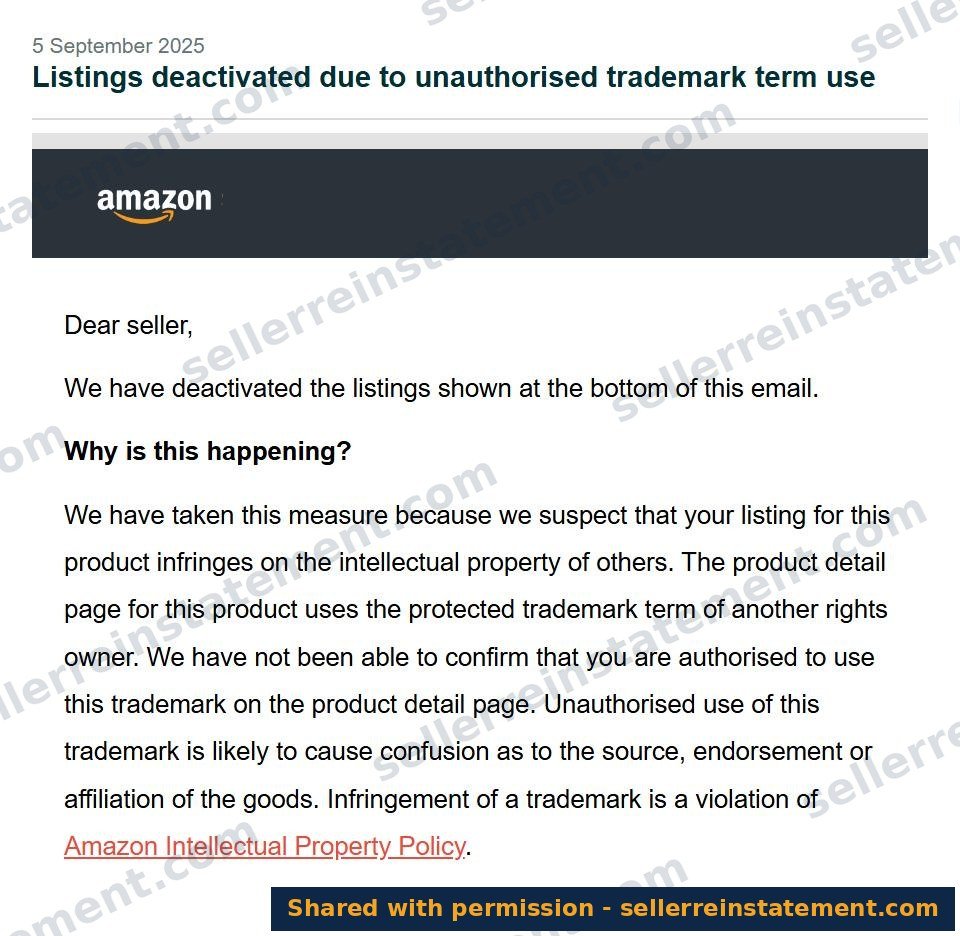
    Amazon notice that listings were deactivated due to unauthorised trademark term use, from a client case shared with permission
    Real notice The Amazon notice this guide explains, from one of our client cases. Shared with permission, store details hidden. Tap to view full size.

    Key takeaways

    • This is about words on the detail page, not about a fake product.
    • The brand that owns the term is shown in the Reason column on the Product Policy Compliance page.
    • Amazon accepts three edits: remove the term, fix the brand name, or add compatibility wording.
    • A compliant edit clears the violation automatically within 8 hours, according to the notice.
    • If you are authorised to use the term, appeal with a letter of authorisation instead of editing.

    Need help with this suspension?

    Send us your notice for a free case review. You get an honest answer before you pay.

    What the notice says

    The subject line is “Listings deactivated due to unauthorised trademark term use” (spelled “unauthorized” on Amazon.com). The key lines are:

    From Amazon’s notice

    The product detail page for this product uses the protected trademark term of another rights owner. We have not been able to confirm that you are authorised to use this trademark on the product detail page.

    Note the wording earlier in the notice: Amazon says it “suspects” the listing infringes. This type of notice comes from Amazon’s own checks on the page text, which is why Amazon offers a self-service fix.

    What usually triggers it

    • A brand name in the title or bullets of a generic product.
    • Comparison wording, such as “like” or “type” next to a brand name.
    • An accessory that names the device brand without saying it is only compatible with it.
    • The wrong brand in the brand field, so the page text and the brand do not match.

    Not sure what your notice is asking for? Tap the green WhatsApp icon on your screen and send us the notice. Reading it is free.

    The three fixes Amazon accepts

    EditWhen it applies
    Remove the trademarked term from the detail page entirelyYour product has nothing to do with that brand.
    Change the brand name so it accurately reflects the productThe product really is that brand, but the brand field says something else.
    Add compatibility terms before the trademarked termYour product is made to work with another product. Amazon’s own examples are “charger for Kindle E-Reader” and “charger compatible with Kindle E-Reader”.

    Amazon notes that there are legal requirements for using compatibility terms, set out in its Intellectual Property Policy. Use them only when the product is truly made for use with the other brand’s product.

    How to fix the listing step by step

    1. Open Account Health and go to Product Policy Compliance, then Suspected Intellectual Property Violations.
    2. Check the Reason column to see which brand’s term Amazon found.
    3. Click Edit next to the ASIN.
    4. Search every field for the term: title, bullet points, description and brand.
    5. Apply one of the three edits and submit the listing for review.
    6. Wait up to 8 hours for the violation to clear automatically.
    7. If it does not clear, submit an explanation through Account Health.

    When to appeal instead of editing

    If you are authorised to use the trademark, do not remove it. Amazon asks for a letter of authorisation or licensing agreement that includes the rights owner’s name and address and explicitly authorises you to make and list products using the trademark. You can also send an explanation with evidence showing why the listing does not violate the policy.

    For complaints filed by a rights owner rather than detected by Amazon, see our IP complaint Plan of Action sample.

    Mistakes to avoid

    • Misspelling the brand on purpose to get past the check.
    • Adding “compatible with” to a product that is not an accessory for that brand.
    • Fixing the title but leaving the term in the bullets or description.
    • Submitting an authorisation letter that is not from the rights owner.

    How our fee works

    A rejected appeal often needs a fresh look rather than another rewrite. You pay a small part to start, and the rest only when you are selling again.

    $150To start: our full investigation ($200 for complex cases). Non-refundable.
    $350Only after your account is reinstated ($400 for complex cases).

    Tap the WhatsApp icon on your screen to start. The first review of your rejection is free.

    Frequently asked questions

    How long does the violation take to clear?

    Amazon’s notice says the violation is removed automatically within 8 hours after you submit a compliant edit for review.

    Is this a counterfeit complaint?

    No. It concerns the use of a trademarked term on the detail page, not whether your product is genuine.

    Can I write “compatible with” a brand name?

    Yes, when your product is truly made for use with that brand’s product. Amazon notes there are legal requirements for compatibility terms in its Intellectual Property Policy.

    Does this affect my Account Health?

    The violation appears under Product Policy Compliance. Clear it promptly so it does not stay open against your account.

    Need help with this suspension?

    Send us your notice for a free case review. You get an honest answer before you pay.

    SellerReinstatement Appeals Team

    The SellerReinstatement appeals team has handled Amazon seller account reinstatement cases since 2014 across every Amazon marketplace. Every guide comes from real cases.

  • Amazon “Submit Product Safety Documentation to Reactivate Listings”: How to Respond

    Amazon deactivated one or more listings because mandatory compliance information is missing. This is a documentation request, not an accusation. The listing comes back when the right document is accepted.

    By SellerReinstatement Appeals TeamUpdated November 20267 min read

    Quick answer

    The notice means Amazon needs proof that the product meets the safety rules for its category. Open the product compliance request on your Account Health page, read the requirement listed for each ASIN at the end of the email, and upload the document it names, or evidence that the product is exempt. Amazon says it only reinstates products that fulfil the compliance requirements.

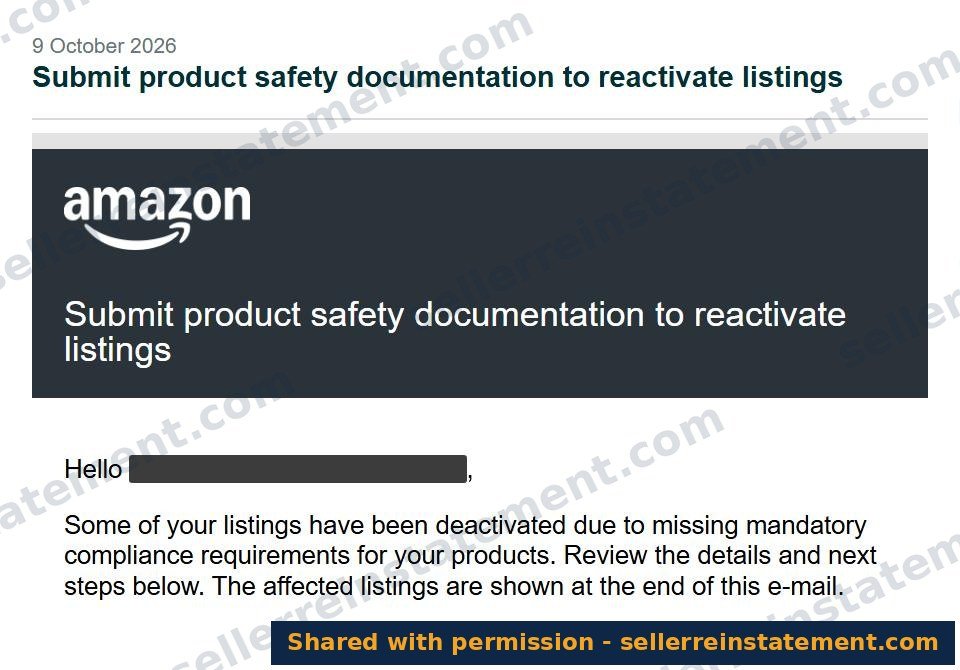
    Amazon notice asking a seller to submit product safety documentation to reactivate listings, from a client case shared with permission
    Real notice The Amazon notice this guide explains, from one of our client cases. Shared with permission, store details hidden. Tap to view full size.

    Key takeaways

    • The requirement is product-specific. The table at the end of the email says what applies to each ASIN.
    • You can either submit the documents or show that the product is exempt.
    • Amazon says the ASIN stays deactivated until the request is fulfilled by you or another seller listing the product.
    • FBA stock for these products must be removed within 30 days of the notice, or Amazon disposes of it at your expense.
    • Close or delete listings you do not plan to sell or appeal.

    Need help with this suspension?

    Send us your notice for a free case review. You get an honest answer before you pay.

    What the notice says

    The subject line is “Submit product safety documentation to reactivate listings”. The key sentence is:

    From Amazon’s notice

    Some of your listings have been deactivated due to missing mandatory compliance requirements for your products.

    Amazon adds that it used a combination of automated means and expert human review to make the decision. In one client case the product was a stainless steel water bottle, and Amazon asked the seller to show that hot flasks and bottles listed on Amazon India comply with the applicable laws, regulations, standards and Amazon policies.

    What Amazon is asking for

    This is not about your performance or the authenticity of your stock. Amazon wants a document that proves the product itself meets the rules for its category in that marketplace.

    Depending on the product and country, that can be a test report from an accredited laboratory, a certificate or licence from the national standards body, a declaration of conformity, or images showing the required markings on the product and packaging. The notice tells you which one.

    Not sure what your notice is asking for? Tap the green WhatsApp icon on your screen and send us the notice. Reading it is free.

    How to reactivate the listings

    1. Open Account Health and find the product compliance requests.
    2. Read the requirement for each ASIN. Note the exact standard or document named.
    3. Ask the manufacturer or brand for that document. It must cover the same product and model you list.
    4. Check it before uploading. Product name, brand and model should match the listing, and the document should be in date and issued by a recognised body.
    5. Upload it through the compliance request. If the product is exempt, upload evidence that explains why.
    6. Deal with FBA stock. If you cannot comply, create a removal order within 30 days.
    7. Close or delete affected listings you will not support.

    Mistakes that keep listings deactivated

    • Sending a purchase invoice. An invoice proves where you bought the product, not that it is compliant.
    • A certificate for a different model or a different manufacturer.
    • An expired document or a report from a laboratory that is not accredited.
    • Waiting for another seller to fix it. That can happen, but you have no control over when.
    • Leaving the listing open and ignoring the request. Amazon asks you to close or delete listings you do not intend to sell or appeal.

    When to get help

    Get help when the manufacturer cannot supply the document, when you are not sure which standard applies, or when Amazon rejects a document you believe is correct. Our guide to reading an Amazon notice shows how to find what Amazon is really asking for.

    How our fee works

    A rejected appeal often needs a fresh look rather than another rewrite. You pay a small part to start, and the rest only when you are selling again.

    $150To start: our full investigation ($200 for complex cases). Non-refundable.
    $350Only after your account is reinstated ($400 for complex cases).

    Tap the WhatsApp icon on your screen to start. The first review of your rejection is free.

    Frequently asked questions

    Is this an account suspension?

    No. It is a listing-level action. Amazon asks you to close or delete non-compliant listings to avoid further impact on your account.

    I am a reseller and do not have these documents. What can I do?

    Ask the brand, manufacturer or your distributor. If nobody can supply the document, close the listing.

    What happens to my FBA inventory?

    The notice says you must remove these products from fulfilment centres within 30 days, or Amazon disposes of them at your expense.

    Can another seller’s documents reactivate the listing?

    Amazon says the ASIN stays deactivated until the compliance request is fulfilled by you or another selling partner listing the product.

    Need help with this suspension?

    Send us your notice for a free case review. You get an honest answer before you pay.

    SellerReinstatement Appeals Team

    The SellerReinstatement appeals team has handled Amazon seller account reinstatement cases since 2014 across every Amazon marketplace. Every guide comes from real cases.

  • Amazon “Unable to Validate the Authenticity of the Documentation”: What to Send Next

    Amazon reviewed your appeal and rejected the documents themselves, not your explanation. Sending the same files again will not work. Here is why documents fail verification and what Amazon accepts instead.

    By SellerReinstatement Appeals TeamUpdated November 20268 min read

    Quick answer

    This rejection means Amazon could not verify that your invoice or authorisation letter is genuine and unaltered. Do not resubmit the same file. Send documents Amazon can check with the issuer, such as a letter of authorisation from the rights owner or supplier invoices from the last 180 days that match your account details, through “Submit new information” on your Account Health page.

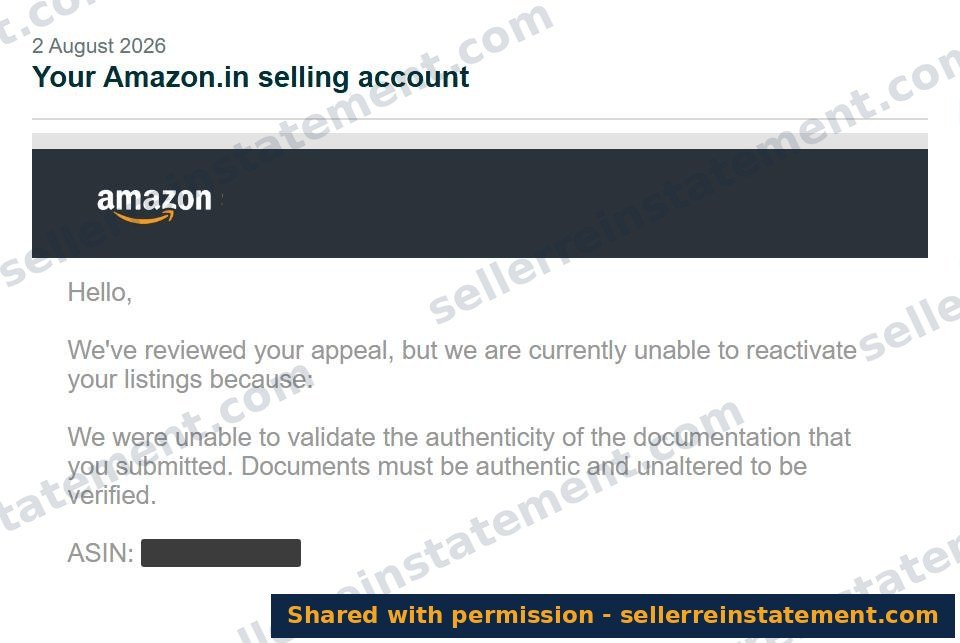
    Amazon notice saying it was unable to validate the authenticity of the documentation submitted, from a client case shared with permission
    Real notice The Amazon notice this guide explains, from one of our client cases. Shared with permission, store details hidden. Tap to view full size.

    Key takeaways

    • The problem is the document, not your wording. A better-written appeal with the same file fails again.
    • Amazon says documents must be authentic and unaltered to be verified.
    • The notice lists your options: a retraction from the rights owner, a letter of authorisation, supplier invoices, or legal documentation.
    • Invoices must be issued in the last 180 days, dated before the notice, and carry a business name that matches your seller account.
    • Never edit a document to make it fit. An altered document can turn a listing problem into an account problem.

    Need help with this suspension?

    Send us your notice for a free case review. You get an honest answer before you pay.

    What the rejection says

    This message arrives after you appeal a listing that was removed on a rights owner’s report. The subject is usually “Your Amazon selling account” for your marketplace. The key lines are:

    From Amazon’s notice

    We were unable to validate the authenticity of the documentation that you submitted. Documents must be authentic and unaltered to be verified.

    The listing stays inactive, and the notice goes on to list what Amazon will accept next.

    Why documents fail verification

    • The file was edited. Details typed over, pages merged, or an invoice rebuilt in an editor. Amazon checks for this.
    • The supplier cannot be verified. No full address, phone, website or tax number that Amazon can check.
    • Names do not match. The buyer name or address on the invoice differs from your Seller Central account.
    • Dates are wrong. The invoice is older than 180 days or dated after the notice.
    • Quantities are too small. The invoice does not cover what you sold.
    • The letter is from the wrong party. An authorisation from a distributor is not an authorisation from the rights owner.

    Not sure what your notice is asking for? Tap the green WhatsApp icon on your screen and send us the notice. Reading it is free.

    What Amazon says it will accept

    OptionWhat it must show
    RetractionThe rights owner withdraws the complaint. Their contact details are in the Complaint Details section.
    Letter of authorisation or licensing agreementThe rights owner’s name and address, your name and address matching your seller account, the intellectual property authorised, the products or ASINs covered, the scope of permission and valid dates.
    Supplier invoicesIssued in the last 180 days and dated before the notice, with the supplier’s name and complete address, clear product identification, a business name matching your account, and covering 90% of sales volume.
    Legal documentationA valid court order, or a letter of non-infringement from legal counsel.

    This list is taken from Amazon’s own notice. Check the wording in your notice, because requirements differ by complaint type.

    How to respond after this rejection

    1. Stop resubmitting. The same file gets the same answer.
    2. Get the original from the source. Ask your supplier for the original invoice file, and confirm they will answer if Amazon contacts them.
    3. Match every detail to Seller Central. Legal name and address must be the same. If you trade under another name, add a document that shows it.
    4. If your supplier is not the rights owner, ask the rights owner for a letter of authorisation or a retraction. See our guide to getting an IP complaint retracted.
    5. If you cannot get genuine documents, do not appeal with altered ones. Remove the listing and say so honestly.
    6. Submit through “Submit new information” next to the violation, with a short note saying what is different this time.

    Mistakes that make this worse

    • Editing the invoice. Changing a name, date or quantity is the fastest way to lose the account.
    • Sending photos or screenshots of a document when the original file exists.
    • Using an invoice from a different company or a different product version.
    • Arguing with the decision instead of changing the evidence.

    For what a valid invoice looks like, see our guide to Amazon invoice requirements for reinstatement.

    How our fee works

    A rejected appeal often needs a fresh look rather than another rewrite. You pay a small part to start, and the rest only when you are selling again.

    $150To start: our full investigation ($200 for complex cases). Non-refundable.
    $350Only after your account is reinstated ($400 for complex cases).

    Tap the WhatsApp icon on your screen to start. The first review of your rejection is free.

    Frequently asked questions

    Does this rejection deactivate my whole account?

    No. It keeps the listing inactive. Unresolved violations still count against your Account Health, so do not leave it open.

    How many times can I appeal?

    Amazon does not publish a limit. Each failed submission of the same documents makes the next review harder, so change the evidence, not the wording.

    My supplier is a distributor, not the brand. Is that enough?

    For a rights owner complaint, a letter of authorisation or a retraction from the rights owner is the stronger route. Genuine distributor invoices can still support your case.

    Can I resend the same invoice with a longer explanation?

    No. Amazon rejected the document, not the explanation.

    Need help with this suspension?

    Send us your notice for a free case review. You get an honest answer before you pay.

    SellerReinstatement Appeals Team

    The SellerReinstatement appeals team has handled Amazon seller account reinstatement cases since 2014 across every Amazon marketplace. Every guide comes from real cases.

  • Amazon “Seller-Fulfilled Offers Will Be Deactivated in 72 Hours”: What to Do

    This warning arrives when your order defect rate crosses 1%. Amazon gives you 72 hours to answer before it switches off every offer you ship yourself. Here is what the notice means and what to send.

    By SellerReinstatement Appeals TeamUpdated November 20267 min read

    Quick answer

    The notice means your order defect rate is above Amazon’s 1% target and your seller-fulfilled offers will be switched off unless you respond within 72 hours. Follow the banner at the top of your Account Health page, find which orders caused the defects, appeal any defect that should not count, and submit a short Plan of Action built on those orders.

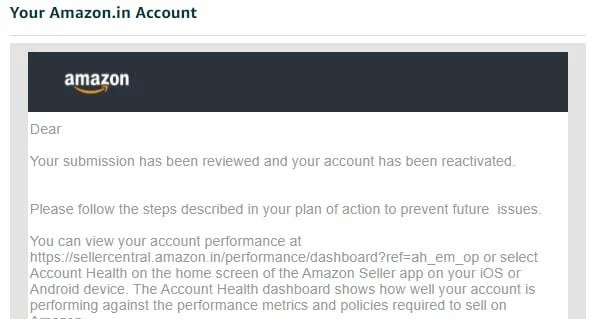
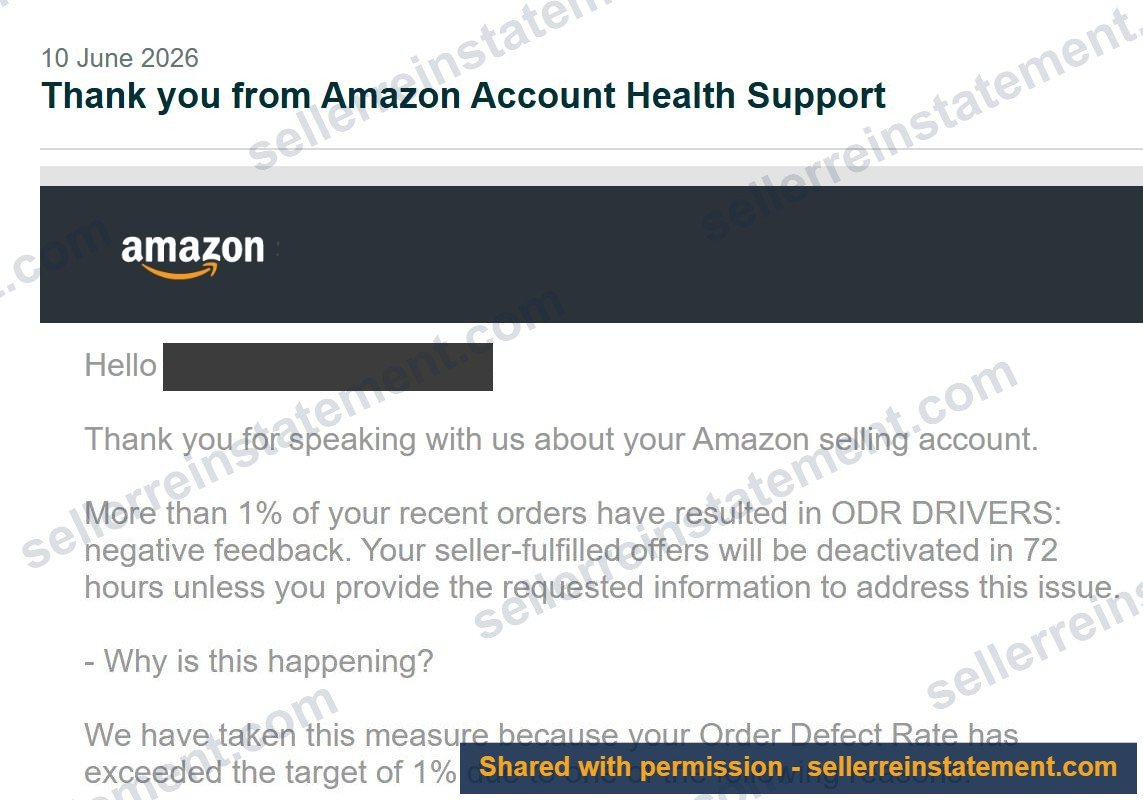
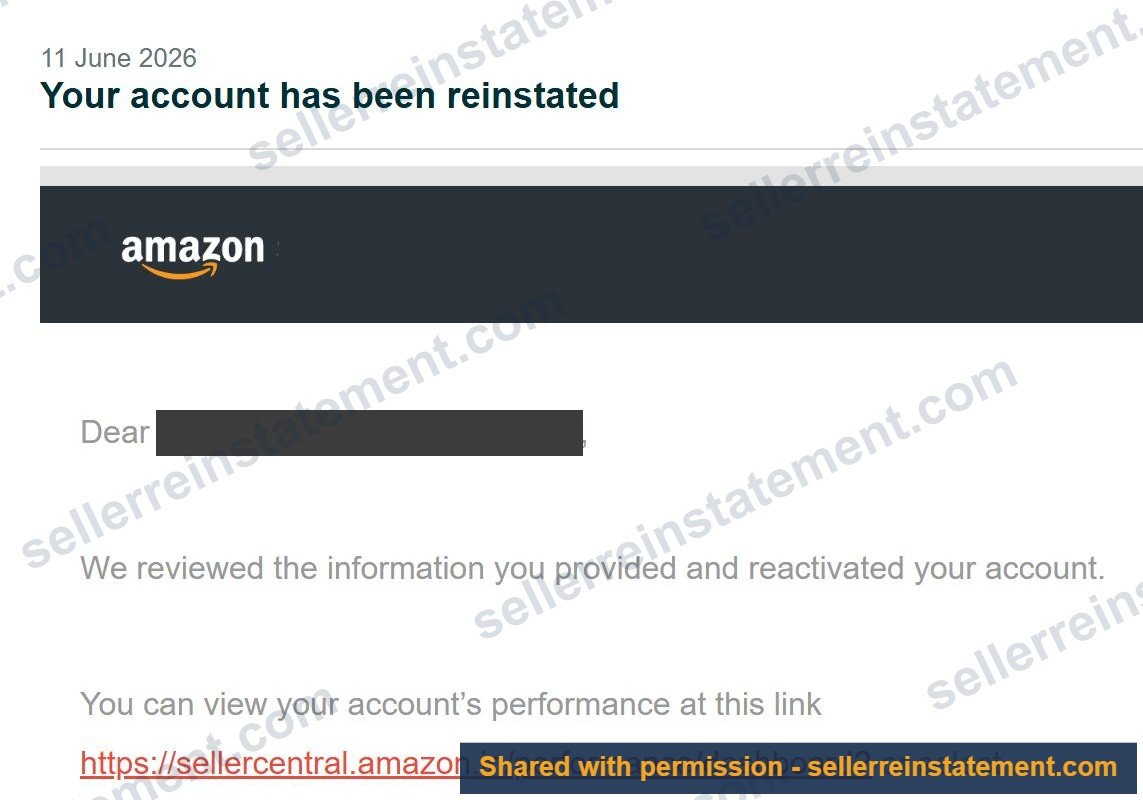
    Real Amazon reinstatement email from one of our client cases, shared with the client's permission
    Real result Amazon email from one of our client cases, shared with permission. Tap to view full size.

    Key takeaways

    • The 72 hours run from the notice. The response goes through the banner at the top of your Account Health page.
    • Order defect rate counts negative feedback, A-to-z Guarantee claims that are not denied and credit card chargebacks, out of your total orders in a 60-day period.
    • The notice names the driver. In the client case below it was negative feedback.
    • This notice is about the offers you ship yourself. Orders fulfilled by Amazon are not what it switches off.
    • Appeal the defects that should not count before you write the Plan of Action.

    Need help with this suspension?

    Send us your notice for a free case review. You get an honest answer before you pay.

    What the 72-hour notice says

    The email usually arrives under the subject “Thank you from Amazon Account Health Support”, often after a call with the Account Health team. The key sentence is this:

    From Amazon’s notice

    Your seller-fulfilled offers will be deactivated in 72 hours unless you provide the requested information to address this issue.

    The notice also names what pushed the rate up, shown as “ODR DRIVERS”. It then lists the usual reasons: buyers not receiving orders or receiving them late, shipments that arrive damaged, incomplete or lost because of packaging, incomplete orders, and complaints about unresponsive or poor customer service.

    What the warning means for your account

    Amazon defines order defect rate as the share of all orders that result in negative feedback, an A-to-z Guarantee claim that is not denied, or a credit card chargeback, out of the total orders in a 60-day period. The target is under 1%.

    At low order volumes, very few defects are enough. A seller with 200 orders in the period crosses 1% at the third defect. That is why this notice often surprises small seller-fulfilled stores.

    If you do not respond, Amazon switches off the offers you fulfil yourself. For a store that ships everything itself, that stops all sales, even though the account is still open.

    Not sure what your notice is asking for? Tap the green WhatsApp icon on your screen and send us the notice. Reading it is free.

    How to respond inside 72 hours

    1. Open Account Health. The response goes through the banner at the top of the page, not by replying to the email.
    2. List every defect. Pull the orders for the last 60 days and write down each defect: order ID, type (feedback, claim or chargeback) and what the buyer said.
    3. Appeal what should not count. Amazon lets you appeal A-to-z claims, ask for removal of seller feedback that breaks its feedback rules, and respond to chargeback claims. Each one removed lowers the rate.
    4. Group what remains by cause. Late dispatch, carrier loss, packaging, wrong item, slow replies. The largest group is your root cause.
    5. Write the Plan of Action. State the root cause with the order numbers behind it, what you have already changed, and how you will stop it happening again. See our performance Plan of Action sample.
    6. Submit before the deadline. A short, specific plan sent on day one is better than a long one sent on day four.

    Mistakes that get this response rejected

    • Waiting for the rate to fall on its own. The 72 hours pass first.
    • General promises. “We will improve our service” tells Amazon nothing. Name the orders and the fix.
    • Blaming buyers, carriers or Amazon. Explain what you control and what you changed.
    • Offering buyers anything to remove feedback. That breaks Amazon policy and creates a second violation.
    • Opening a second account to keep selling. That leads to a related-accounts deactivation, which is much harder to fix.

    Real case: warning to reinstated in 1 day

    On 10 June 2026 Amazon sent this warning to a seller-fulfilled Amazon.in store, naming negative feedback as the driver. After the response was submitted, Amazon confirmed the account was reinstated on 11 June 2026. Both notices are shown with store details hidden, shared with the client’s permission. Every case is different and no result is guaranteed.

    Amazon notice warning that seller-fulfilled offers will be deactivated in 72 hours for order defect rate above 1 percent
    Before: the 72-hour warning, 10 June 2026
    Amazon email confirming the same seller account was reinstated the next day
    After: reinstatement email, 11 June 2026

    How our fee works

    A rejected appeal often needs a fresh look rather than another rewrite. You pay a small part to start, and the rest only when you are selling again.

    $150To start: our full investigation ($200 for complex cases). Non-refundable.
    $350Only after your account is reinstated ($400 for complex cases).

    Tap the WhatsApp icon on your screen to start. The first review of your rejection is free.

    Frequently asked questions

    What happens if I do not reply within 72 hours?

    Amazon’s notice says your seller-fulfilled offers will be deactivated. You can still appeal afterwards with a Plan of Action, but you lose sales while the offers are off.

    Does this notice affect my FBA offers?

    The notice names seller-fulfilled offers. Orders fulfilled by Amazon can still add to your order defect rate through feedback and claims.

    What counts toward order defect rate?

    Negative feedback, A-to-z Guarantee claims that are not denied and credit card chargebacks, measured against your total orders in a 60-day period.

    Can negative feedback be removed from my order defect rate?

    Amazon removes seller feedback that breaks its feedback rules when you request it. Never offer a buyer anything in return for removing feedback.

    Need help with this suspension?

    Send us your notice for a free case review. You get an honest answer before you pay.

    SellerReinstatement Appeals Team

    The SellerReinstatement appeals team has handled Amazon seller account reinstatement cases since 2014 across every Amazon marketplace. Every guide comes from real cases.