Amazon reviewed your appeal and rejected the documents themselves, not your explanation. Sending the same files again will not work. Here is why documents fail verification and what Amazon accepts instead.
Quick answer
This rejection means Amazon could not verify that your invoice or authorisation letter is genuine and unaltered. Do not resubmit the same file. Send documents Amazon can check with the issuer, such as a letter of authorisation from the rights owner or supplier invoices from the last 180 days that match your account details, through “Submit new information” on your Account Health page.
Key takeaways
- The problem is the document, not your wording. A better-written appeal with the same file fails again.
- Amazon says documents must be authentic and unaltered to be verified.
- The notice lists your options: a retraction from the rights owner, a letter of authorisation, supplier invoices, or legal documentation.
- Invoices must be issued in the last 180 days, dated before the notice, and carry a business name that matches your seller account.
- Never edit a document to make it fit. An altered document can turn a listing problem into an account problem.
Need help with this suspension?
Send us your notice for a free case review. You get an honest answer before you pay.
What the rejection says
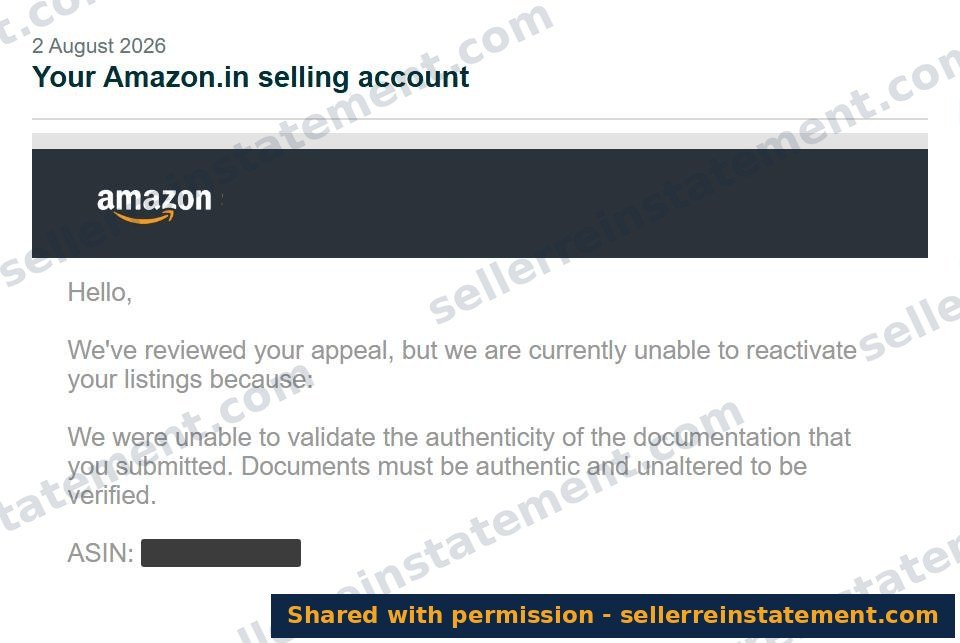
This message arrives after you appeal a listing that was removed on a rights owner’s report. The subject is usually “Your Amazon selling account” for your marketplace. The key lines are:
From Amazon’s notice
We were unable to validate the authenticity of the documentation that you submitted. Documents must be authentic and unaltered to be verified.
The listing stays inactive, and the notice goes on to list what Amazon will accept next.
Why documents fail verification
- The file was edited. Details typed over, pages merged, or an invoice rebuilt in an editor. Amazon checks for this.
- The supplier cannot be verified. No full address, phone, website or tax number that Amazon can check.
- Names do not match. The buyer name or address on the invoice differs from your Seller Central account.
- Dates are wrong. The invoice is older than 180 days or dated after the notice.
- Quantities are too small. The invoice does not cover what you sold.
- The letter is from the wrong party. An authorisation from a distributor is not an authorisation from the rights owner.
Not sure what your notice is asking for? Tap the green WhatsApp icon on your screen and send us the notice. Reading it is free.
What Amazon says it will accept
| Option | What it must show |
|---|---|
| Retraction | The rights owner withdraws the complaint. Their contact details are in the Complaint Details section. |
| Letter of authorisation or licensing agreement | The rights owner’s name and address, your name and address matching your seller account, the intellectual property authorised, the products or ASINs covered, the scope of permission and valid dates. |
| Supplier invoices | Issued in the last 180 days and dated before the notice, with the supplier’s name and complete address, clear product identification, a business name matching your account, and covering 90% of sales volume. |
| Legal documentation | A valid court order, or a letter of non-infringement from legal counsel. |
This list is taken from Amazon’s own notice. Check the wording in your notice, because requirements differ by complaint type.
How to respond after this rejection
- Stop resubmitting. The same file gets the same answer.
- Get the original from the source. Ask your supplier for the original invoice file, and confirm they will answer if Amazon contacts them.
- Match every detail to Seller Central. Legal name and address must be the same. If you trade under another name, add a document that shows it.
- If your supplier is not the rights owner, ask the rights owner for a letter of authorisation or a retraction. See our guide to getting an IP complaint retracted.
- If you cannot get genuine documents, do not appeal with altered ones. Remove the listing and say so honestly.
- Submit through “Submit new information” next to the violation, with a short note saying what is different this time.
Mistakes that make this worse
- Editing the invoice. Changing a name, date or quantity is the fastest way to lose the account.
- Sending photos or screenshots of a document when the original file exists.
- Using an invoice from a different company or a different product version.
- Arguing with the decision instead of changing the evidence.
For what a valid invoice looks like, see our guide to Amazon invoice requirements for reinstatement.
How our fee works
A rejected appeal often needs a fresh look rather than another rewrite. You pay a small part to start, and the rest only when you are selling again.
Tap the WhatsApp icon on your screen to start. The first review of your rejection is free.
Frequently asked questions
Does this rejection deactivate my whole account?
No. It keeps the listing inactive. Unresolved violations still count against your Account Health, so do not leave it open.
How many times can I appeal?
Amazon does not publish a limit. Each failed submission of the same documents makes the next review harder, so change the evidence, not the wording.
My supplier is a distributor, not the brand. Is that enough?
For a rights owner complaint, a letter of authorisation or a retraction from the rights owner is the stronger route. Genuine distributor invoices can still support your case.
Can I resend the same invoice with a longer explanation?
No. Amazon rejected the document, not the explanation.
Need help with this suspension?
Send us your notice for a free case review. You get an honest answer before you pay.
Need help with a rights owner complaint? See our Amazon IP complaint removal service.
Get Amazon account-health alerts
New policy changes, common deactivation triggers and how to avoid them. Occasional emails from our appeals team, no spam.
By subscribing you agree to receive emails from SellerReinstatement. Unsubscribe anytime. See our Privacy Policy.
Leave a Reply