Amazon deactivated a listing because the detail page uses another brand’s trademarked term. Unlike most intellectual property notices, this one comes with a fix you can make yourself, and the violation can clear within hours.
Quick answer
The notice means your product detail page uses a trademarked term that Amazon cannot confirm you are authorised to use. Open the Suspected Intellectual Property Violations section on your Account Health page, click Edit next to the ASIN, and either remove the term, correct the brand name, or add a compatibility phrase such as “compatible with”. Amazon says the violation is removed automatically within 8 hours once you submit a compliant edit.
Key takeaways
- This is about words on the detail page, not about a fake product.
- The brand that owns the term is shown in the Reason column on the Product Policy Compliance page.
- Amazon accepts three edits: remove the term, fix the brand name, or add compatibility wording.
- A compliant edit clears the violation automatically within 8 hours, according to the notice.
- If you are authorised to use the term, appeal with a letter of authorisation instead of editing.
Need help with this suspension?
Send us your notice for a free case review. You get an honest answer before you pay.
What the notice says
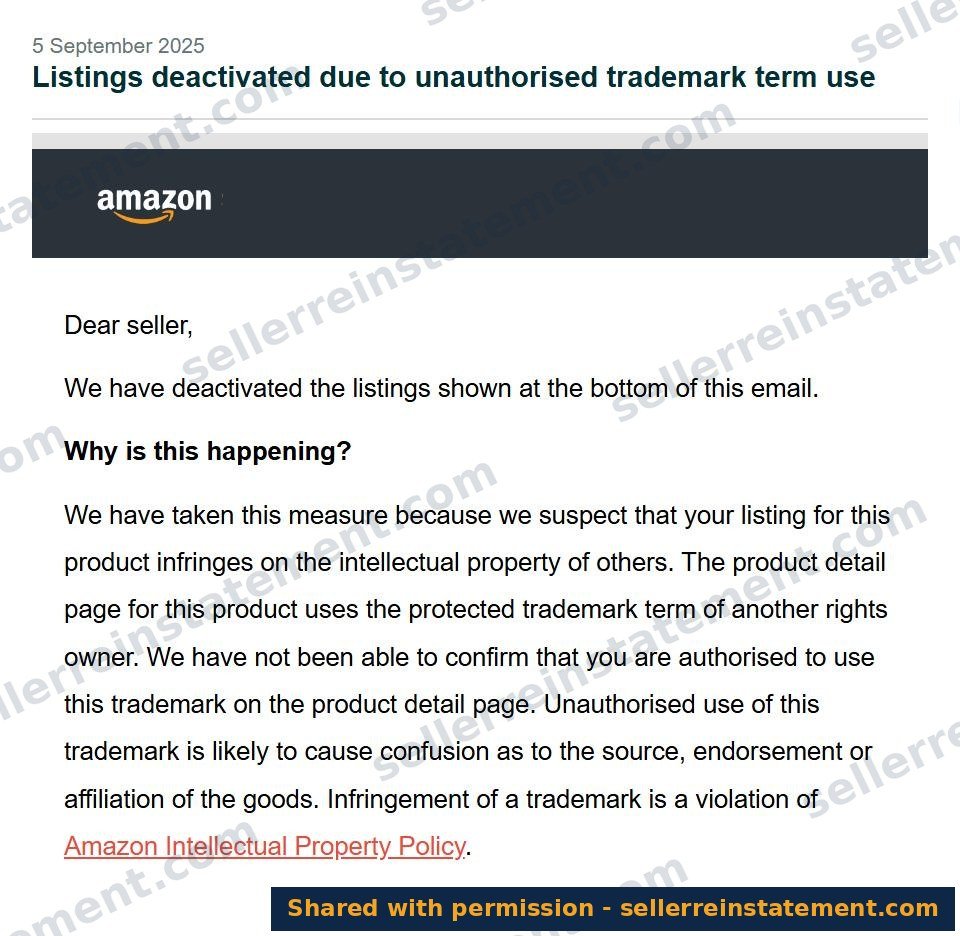
The subject line is “Listings deactivated due to unauthorised trademark term use” (spelled “unauthorized” on Amazon.com). The key lines are:
From Amazon’s notice
The product detail page for this product uses the protected trademark term of another rights owner. We have not been able to confirm that you are authorised to use this trademark on the product detail page.
Note the wording earlier in the notice: Amazon says it “suspects” the listing infringes. This type of notice comes from Amazon’s own checks on the page text, which is why Amazon offers a self-service fix.
What usually triggers it
- A brand name in the title or bullets of a generic product.
- Comparison wording, such as “like” or “type” next to a brand name.
- An accessory that names the device brand without saying it is only compatible with it.
- The wrong brand in the brand field, so the page text and the brand do not match.
Not sure what your notice is asking for? Tap the green WhatsApp icon on your screen and send us the notice. Reading it is free.
The three fixes Amazon accepts
| Edit | When it applies |
|---|---|
| Remove the trademarked term from the detail page entirely | Your product has nothing to do with that brand. |
| Change the brand name so it accurately reflects the product | The product really is that brand, but the brand field says something else. |
| Add compatibility terms before the trademarked term | Your product is made to work with another product. Amazon’s own examples are “charger for Kindle E-Reader” and “charger compatible with Kindle E-Reader”. |
Amazon notes that there are legal requirements for using compatibility terms, set out in its Intellectual Property Policy. Use them only when the product is truly made for use with the other brand’s product.
How to fix the listing step by step
- Open Account Health and go to Product Policy Compliance, then Suspected Intellectual Property Violations.
- Check the Reason column to see which brand’s term Amazon found.
- Click Edit next to the ASIN.
- Search every field for the term: title, bullet points, description and brand.
- Apply one of the three edits and submit the listing for review.
- Wait up to 8 hours for the violation to clear automatically.
- If it does not clear, submit an explanation through Account Health.
When to appeal instead of editing
If you are authorised to use the trademark, do not remove it. Amazon asks for a letter of authorisation or licensing agreement that includes the rights owner’s name and address and explicitly authorises you to make and list products using the trademark. You can also send an explanation with evidence showing why the listing does not violate the policy.
For complaints filed by a rights owner rather than detected by Amazon, see our IP complaint Plan of Action sample.
Mistakes to avoid
- Misspelling the brand on purpose to get past the check.
- Adding “compatible with” to a product that is not an accessory for that brand.
- Fixing the title but leaving the term in the bullets or description.
- Submitting an authorisation letter that is not from the rights owner.
How our fee works
A rejected appeal often needs a fresh look rather than another rewrite. You pay a small part to start, and the rest only when you are selling again.
Tap the WhatsApp icon on your screen to start. The first review of your rejection is free.
Frequently asked questions
How long does the violation take to clear?
Amazon’s notice says the violation is removed automatically within 8 hours after you submit a compliant edit for review.
Is this a counterfeit complaint?
No. It concerns the use of a trademarked term on the detail page, not whether your product is genuine.
Can I write “compatible with” a brand name?
Yes, when your product is truly made for use with that brand’s product. Amazon notes there are legal requirements for compatibility terms in its Intellectual Property Policy.
Does this affect my Account Health?
The violation appears under Product Policy Compliance. Clear it promptly so it does not stay open against your account.
Need help with this suspension?
Send us your notice for a free case review. You get an honest answer before you pay.
Need help with a trademark or IP violation? See our Amazon IP complaint removal service.
Get Amazon account-health alerts
New policy changes, common deactivation triggers and how to avoid them. Occasional emails from our appeals team, no spam.
By subscribing you agree to receive emails from SellerReinstatement. Unsubscribe anytime. See our Privacy Policy.
Leave a Reply